

网工干货知识
- 文章知识点
- 超全学习笔记
- 无线技术专题
- 网工技术科普
- 云计算容灾方案分析
- VxLan背景及概念
- 桌面云fusionaccess架构
- 虚拟化架构和私有云架构
- 华为SDN控制器应用场景
- 数据中心网络技术的演进发
- 你所了解的vxlan基础
- 细说防火墙双机热备
- 防火墙虚拟系统介绍
- 解析路由分类
- 华为FusionSphere虚拟化
- 防火墙虚拟系统
- eBackup备份组网
- 容灾方案介绍
- 防火墙智能选路
- 网络时间协议NTP
- 了解网络结构并进行故障定
- 什么是云计算?
- 云计算10个入门基础知识
- 云计算服务模式与关键技术
- WLAN标准协议
- 何为SaaS
- 运输与应用层面试问题 – 计
- 路由与交换相关的问题——
- 数据传输相关的问题——计
- 网络协议
- 什么是SSL终止?它的工作原
- 什么是反向代理?其工作原
- DNS服务器是什么?
- 私有DNS是什么?
- DNS检查器是什么?
- 物理层服务是什么?
- 数据链路层服务是什么?
- 表示层服务是什么?
- 应用层服务是什么?
- 用于GATE CSE考试的计算机网络
- 计算机网络模型是什么?
- 什么时候应该优先选择UDP而
- OSI模型类比法——对OSI七层
- 1.1.1.1是什么?
- 那么,0.0.0.0 DNS服务器到底是
- 保留的IP地址
- IP自定义子网掩码是什么?
- 网络中的通配符掩码
- 什么是IP子网零?
- 什么是后门攻击?
- 典型的HTTP会话
- HTTP严格传输安全策略(HSTS)
- 数据加密与数据掩蔽之间的
- 什么是“隐私增强计算”?
- 什么是无密码认证?
- 反向DNS查询是什么?
- 什么是域名生成算法?
- DNS洪水攻击是什么?
- 什么是子域攻击/域控制攻击
- DNS缓存窥探是什么?
- 先进的分布式系统
- 什么是DNS预取?
- 什么是DNS缓存?
- 分布式系统中的冲突与并发
- 分布式系统中的通信协议
- 分布式系统中的可串行化性
- 分布式系统中的资源发现
- DNS放大攻击是什么?
- DNS隧道技术是什么?
- 分布式系统中的漏洞与威胁
- 分布式系统的最新趋势
- 分布式系统中的组合结构
- 在分布式系统中处理网络分
- 分布式系统中重要的自修复
- 分布式系统中的调试技术
- 自适应分布式系统
- 分布式系统中的数据来源
- 在分布式系统中的可用性
- 什么是域名系统安全扩展(DN
- 分布式系统中的分布式账本
- 分布式系统中的故障检测与
- 什么是集群管理系统?
- 分布式系统的授权机制
- 快速以太网是什么?
- Clampi病毒到底是什么?
- 对称密钥加密与非对称密钥
- 顶级桌面技术支持工程师面
- TETRA(地面中继无线电)
- 在分布式系统中处理竞争条
- 分布式系统中的背压问题
- RFC(请求意见/反馈)是什么
- 用于物联网应用的5G网络切片
- 什么是Micro USB呢?
- 在密码学中,什么是单向函
- 什么是网络安全合规性?
- 什么是公告板系统?
- 加密技术与摘要技术在密码
- 如何移除假冒的杀毒软件?
- 什么是互联网主干网络呢?
- 什么是“诱饵转移”骗局?
- Web3架构与技术栈是什么?
- 网络安全中的“SafeSearch”是
- 信息安全中的线性密码分析
- PAXOS共识算法是什么?
- 什么是互联网Cookies?
- 零售领域中的网络安全基础
- 如何在网络安全方面防止身
- 什么是诈骗网站?它们是什
- 什么是知识产权冲突?如何
- 在密码学中,什么是扩展排
- 什么是“解压炸弹”(Zip Bomb
- 在密码学中,安全的哈希算
- “Cipher”指的是什么?
- 网络安全中的“Red Teaming”指
- Web3与Web3.0:它们之间有什么
- 漏洞赏金计划的概念
- 无线网络漫游与切换协议
- 不可路由协议与可路由协议
- 什么是虚假的杀毒软件?
- DApp开发是什么?
- 安全层析成像与分层攻击者
- 什么是“网络春季大扫除”
- 什么是“僵尸饼干”?能否
- 为什么Web3至今仍未成为主流
- 在计算机领域里,什么是“Su
- 如何防止暴力攻击?
- 实施无线分割技术
- 诊断和解决网络速度缓慢问
- 什么是Round Cipher?
- 什么是互联网标准?
- 如何追踪一个电子邮件地址
- 用于入侵检测与预防的网络
- DNSSEC(域名系统安全扩展)
- BGP路由聚合与路由汇总
- 如何扫描Zip文件中的病毒或
- IPv6邻居发现与无状态地址自
- 如何防止启动扇区被病毒感
- 什么是网络诽谤?
- 什么是虚拟通道?
- OTP与密码的对比
- 什么是潜在有害程序(PUP)
- 世界知识产权组织是什么?
- 分布式系统与集群式系统的
- 什么是反向DNS?
- 网络法律的重要性是什么?
- 如何对Chrome浏览器进行病毒
- 什么是“计算机破解专家”
- 在网络安全领域,什么是“
- EDR与EPP有什么区别?
- 什么是跟踪Cookie?如何阻止
- 什么是灰软件?
- 什么是数字版权管理(Digital
- 数字认证的类型
- 反向域名劫持是什么?
- 为什么AES能够取代DES、3DES和T
- 计算机中的“Gopher”是什么
- 网络犯罪中的网络破坏行为
- 什么是“哑终端”呢?
- 什么是用户认证策略?
- 能源行业中的网络安全基础
- 什么是数字逮捕?
- 什么是通信设备?
- 网络功能虚拟化(NFV)实施
- Unicode转换格式是什么?
- 什么是正数字足迹和负数字
- 长密码的优缺点
- 什么是NACK(否定确认)?
- 直通电缆与交叉连接的电缆
- 计算机网络与分布式系统的
- 密码的类型有哪些?
- 什么是DNS劫持?
- 什么是命令?
- 摘要函数与哈希函数之间有
- 什么是“Zip Bomb”,它是如何
- 如何报告不同类型的网络钓
- 如何连接到互联网?
- 如何防止SIM卡交换攻击?
- 计算机网络中,延迟与抖动
- 如何防止内部威胁?
- 密码学中的消息完整性
- Twofish加密算法
- 802.11ac与802.11n的比较
- 什么是S-Box替换?
- ipconfig和ifconfig之间的区别是
- 哈希算法在密码学中的运用
- 在密码学中,什么是强碰撞
- 强大的网络数据平面语言:P4
- 什么是数据包的分割?
- 密码学与密码分析之间的区
- 什么是浏览器劫持程序?
- Mac与Message Digest之间的区别
- WPA3与WPA2有什么区别呢?
- 什么是安全自动化?
- 什么是明文?
- WAN优化与WAN加速的区别
- VoIP与传统电话服务之间的对
- 在密码学中,什么是消息与
- VPN能保护你免受黑客的攻击
- 加密技术是如何用于安全性
- 管理SSH密钥的13种最佳实践
- 在分布式系统中,各个节点
- 如何检测暴力攻击?
- 网络文件系统(NFS)与服务
- 什么是“Mount”?它的功能与
- 什么是钓鱼攻击(Whaling Phishi
- 什么是数据泄露?定义与预
- 密码与密钥的对比
- 在密码学中,EBE模式与CBC模
- 如何对数字设备进行一次彻
- 加密货币是如何使用加密技
- FDM、TDM和WDM之间的区别
- 密码学中的电子密码本(Elect
- 在密码学中,Nonce到底指的是
- OpenFlow与NETCONF的比较
- 文档指纹与消息摘要之间有
- 分布式多媒体系统是什么?
- 在密码学中,什么是N2问题?
- 《Digest》与数字签名之间的
- 如何在分布式存储中持久保
- 密码学中的移位密码技术
- 网络安全中的数字取证
- 分布式系统相关面试问题
- 分布式系统领域的优秀书籍
- 分布式系统原理是什么?
- 在密码学中,什么是指纹技
- 什么是“信任网络”?
- 什么是单字母替换加密法?
- 加密与哈希、加盐技术的区
- 集中式系统与分布式系统
- 什么是密码?
- 密码破解是什么?
- 如何创造积极的数字足迹?
- 什么是商业间谍软件?
- HTTP是什么?
- 什么是数字身份?
- SD-WAN与MPLS的比较
- 网络负载均衡:轮询方式 vs.
- 动态主机配置协议(DHCP)与
- 什么是票证授予服务器(Ticke
- 什么是非否认性?
- IP网络中的虚拟长度子网掩码
- 什么是标题栏?它的作用与
- 什么是“~”符号?它的含义
- 什么是网站审计?它的类型
- 什么是Rootkit?
- 什么是基于目的地的路由方
- 基于目的地的路由与基于源
- 对称密钥加密算法
- 什么是防欺骗技术呢?
- DSL与有线互联网的比较
- 无线网络标准:Wi-Fi 5(802.11a
- 什么是被动拓扑结构呢?
- 什么是Supernet?
- 网络地址转换(NAT)与代理
- 代理服务器与反向代理服务
- 分布式系统中的常见问题及
- 网络安全中的逆向工程技术
- 什么是“密码刷爆”行为?
- 为什么我们需要一个分布式
- 分布式系统在现实生活中的
- NGINX与Traefik之间的区别
- 什么是异常检测?
- 什么是生物识别认证?
- 什么是数据销毁?
- 为什么要构建分布式系统呢
- 分布式存储系统
- 什么是钓鱼攻击模拟?
- TCP数据包和IP数据报中,头部
- 数据是如何在计算机网络上
- 密码攻击与凭证填充的区别
- 当使用超过规定长度的电缆
- 网络犯罪调查
- 密码学的优点与缺点
- 什么是基于证书的认证?
- 什么是数字证书?
- 什么是工业控制系统(Industri
- 虚拟主机的工作原理是什么
- 密码学在医疗系统中是如何
- 光纤中的传播方式
- 什么是移动应用安全?
- 彩虹表攻击与字典攻击的比
- S/MIME到底是什么?
- 什么是智能卡阅读器?
- 在网络安全领域,移动设备
- 网络安全中的网络流量分析
- 什么是网络安全网格?其架
- 网络安全中的隐私工程究竟
- 什么是互联网协议(IP)?
- 受限应用协议(Constrained Appli
- 什么是安全远程访问?
- 网络法律的优缺点
- TCP快速打开与TCP/IP加速技术
- 什么是网络安全审计?
- 数字签名算法(DSA)
- 硬件钱包和软件钱包之间有
- 基于证书的认证是如何工作
- 什么是网络战?
- 什么是移动设备管理(MDM)
- 交换式以太网是什么?
- 什么是安全启动?
- 什么是物联网安全?
- 什么是网络空间?
- 欺诈与伪造的区别
- 金融领域中的网络安全基础
- 非对称密钥加密是什么?
- 如何在Java网络编程中高效地
- 理解关键基础设施中的网络
- 什么是密码漏洞?
- 计算机取证调查程序的五个
- 密码轰炸与字典攻击之间的
- 网络取证技术是什么?
- 什么是网络破坏行为?如何
- 计算机取证的各种类型
- QUIC和HTTP/3究竟是什么?
- HTTP/2究竟是什么?
- 网络霸占行为
- 什么是端口80?
- 加密算法的基础知识
- 什么是网络韧性?
- HTTP/3是什么?它与HTTP/2有何
- 什么是快速以太网?
- 制造业中的网络安全问题
- 什么是网络安全战略?
- 计算机网络的用途
- 物联网中的加密技术
- 儿童和青少年网络安全基础
- SHA-256和SHA-3
- 量子密钥分发(QKD)
- 用于网络流量优化的边缘AI技
- 网络认证协议:RADIUS、TACACS+
- 什么是动态IP地址?
- 什么是每秒千字节数(KBps)
- 什么是网络安全意识?
- 什么是数据隐私?
- SMTP与LMTP之间的区别
- 什么是安全令牌?
- 什么是每秒兆比特数(Mbps)
- 什么是网络虚拟化?
- 为什么UDP比TCP更快呢?
- 什么是隐写技术?
- 三重DES(3DES)
- 调制与解调之间的区别
- 互联网与网络的区别
- 什么是局域网(LAN)?了解
- 互联网网络的类型
- 令牌桶算法是什么?
- 用于车辆自组织网络的SDN技
- BGP(边界网关协议)的高级
- 网络时间协议(NTP)的安全
- 针对RSA算法的选择密码文本
- 什么是IP多播呢?
- TCP拥塞控制算法:Reno、New Ren
- WebSockets协议与长连接机制
- 如何在Windows 11中绕过“将您
- 计算机网络教程
- CDN的全称是**内容分发网络**
- 先进的NAT技术:端口地址转
- 基带与宽带同轴电缆的区别
- POP和POP3电子邮件协议之间的
- 流控制传输协议(SCTP)
- 分布式系统中的身份验证
- 最小汉明距离
- 什么是网络端口?
- 工业控制系统中的加密技术
- 分层路由是什么?
- 网络故障排除技术:Ping、Trac
- 路由选择是什么?
- 无线网络中的动态频谱共享
- 安全架构:类型、要素、框
- 计算机网络中的错误校正
- 苹果Safari浏览器的架构
- 计算机网络中的最短路径算
- Diffie-Hellman密钥交换与完美前
- RSA盲签名是什么?
- Anycast路由及其应用
- 网络监控与数据包捕获技术
- Google Chrome浏览器中的“网络
- Microsoft Edge浏览器中的网络状
- 无线传感器网络中的加密技
- 什么是混合拓扑结构?
- 什么是动态ARP检查?
- IEEE 802.11 MAC层改进技术
- 无线网络中的机会路由机制
- RARP数据包格式
- 什么是小型计算机系统接口
- 光纤电缆是什么?
- 计算机网络中的量子后密码
- IPsec(互联网协议安全)的隧
- OSI模型中物理层的功能
- 实现高可用性和冗余性的网
- 在网络中,物理地址和逻辑
- IPv6过渡机制:6to4、Teredo、ISA
- 会话层的功能
- 什么是多播源发现协议?
- 区分服务(DiffServ)与流量分
- 什么是Smart DNS呢?
- DNS负载均衡:轮询方式、全
- 光纤光传输
- 移动IP与网络移动性协议
- 5G网络中的网络分割技术
- VxLAN与NVGRE:它们有什么区别
- SMTP扩展功能:STARTTLS和DANE
- 计算机网络中的“网关”是
- 地址解析协议 – ARP
- 网络中的端口是什么?
- SSL的工作原理
- 互联网协议上的以太网(Ether
- ARP欺骗与ARP中毒
- 计算机网络中的微波技术
- 代理服务器的优势是什么?
- 传输层协议是什么?
- 网络层协议是什么?
- 广播路由是什么?
- TCP/IP中的应用层协议
- TCP/IP数据包格式
- 计算机网络中的分层架构
- 计算机网络中的中继器
- 网络拓扑结构是什么?
- 什么是调制解调器?
- 带宽有限的信号
- IMAP与POP3、SMTP的区别是什么
- DNS、VPN和Smart DNS:哪一种最
- POP3是什么?即邮件邮局协议
- 光纤的应用有哪些?
- 什么是ARP欺骗?——ARP攻击
- 简单文件传输协议 – TFTP
- 在计算机网络中,什么是流
- 在计算机网络中,什么是负
- 非指导性媒体
- 如何在Packet Tracer中模拟高流
- OSI模型中的网络层
- 集线器与中继器的区别
- 为什么TCP被称为“面向连接
- 个人局域网的优势与劣势
- STOMP协议是什么?
- 广播网络的类型有哪些
- 什么是公共IP地址?
- 什么是网状网络?
- 如何找到回环地址?
- 计算机网络中存在的错误类
- 分布式系统中的容错性
- 子网掩码参考表
- TCP、UDP和SCTP协议之间的区别
- 什么是RJ45连接器呢?
- 用于并行处理器的互连网络
- WLAN与Wi-Fi之间的区别
- VIRUS的全称是……
- 如何在Cisco Catalyst交换机上创
- 密码学教程
- OSI模型中的传输层
- 网络安全领域中,僵尸病毒
- 在网络安全领域,僵尸网络
- 基础设施与“基础设施较少
- 数据通信教程
- 什么是机器人、僵尸网络以
- “不同计算机网络之间的区
- 电路交换机的结构
- 码分多路复用
- 什么是卫星子系统?
- 为什么在数据链路层和网络
- 如何计算往返时间?
- AES与Twofish之间的区别
- 切换 | 计算机网络
- RC4与AES之间的区别
- 什么是Ethereum灵活杠杆指数?
- 传输层中的崩溃恢复机制
- 卫星和光纤互联网
- 延迟与吞吐量的区别
- 分布式系统中的语言同步机
- 集中式账本与分布式账本之
- 计算机网络中的“广播”指
- MAC地址与随机MAC地址
- AES与RSA加密方法的区别
- 网络附加存储的实现方式
- 在密码学中,p-box指的是什么
- 什么是加密货币指数呢?
- SMTP与HTTP之间的区别
- 在Cisco环境中配置OSPF接口成
- Ripple(XRP)Liquid Index究竟是
- 噪声信道协议是什么?
- 分布式系统的优点与缺点
- 针对WiFi网络的无线DOS攻击
- 无线通信中的波束成形类型
- 用于故障排除的Windows网络相
- OSI模型和TCP/IP模型
- 使用NGROK的HTTP服务器,运行
- CRE8指数究竟是什么?
- 不同类型的加密货币和代币
- 什么是去中心化交易所呢?
- 内联网与虚拟专用网络之间
- 什么是Altcoin呢?
- 计算机网络中的数字到数字
- 网关与调制解调器的区别
- VLAN与VPN之间的区别
- VLAN与VSAN之间的区别
- 网络物理系统与嵌入式系统
- 双工技术是什么?
- 连接方式:蓝牙
- 什么是元宇宙代币和元宇宙
- 什么是Dogecoin?
- 配置 OSPF 自动成本参考带宽
- 在Cisco环境中配置每个接口的
- 计算机网络的相关参数/维度
- 分布式系统中的协议与约定
- 临时使用的TCP协议
- CDMA近距通信问题
- 无线局域网中的暴露终端问
- 在 CISCO Packet Tracer 中创建的
- 无线传感器网络中使用的MAC
- 如何在Packet Tracer中创建计算
- 如何在 CISCO Packet Tracer 中在
- 什么是宏病毒?它们是如何
- 什么是服务器名称指示(Serve
- 无线通信中的自适应均衡技
- 在 Cisco Packet Tracer 中,如何
- 遥感技术的应用
- 无线通信链路的结构
- 无线通信中无线电波的传播
- 非对称加密
- IPv6的优势
- 本周的纵横字谜游戏#7(适用
- Cisco WLC的WPA2 PSK认证方式
- IP地址分配与子网划分之间的
- 局域网、城域网和广域网的
- 无线通信中的衰落现象
- 在密码学中,PRG、PRF和PRP的
- 戴维斯-迈耶哈希函数
- Dash加密货币是什么?
- 奈奎斯特采样率与奈奎斯特
- 网络物理系统简介
- WSNs中的S-MAC协议
- 网络物理系统与物联网之间
- 具有缓冲能力和序列信息的TC
- Stellar Blockchain究竟是什么?
- 分层式自组织网络路由协议
- 无线通信中的Friis方程
- 如何使用自定义函数将实时
- 网络应用的原则
- 密码学中的Merkle-Damgard方案
- 光纤通道层
- 什么是外部IP地址?
- 用于优化TCP协议的Karn算法
- 从4G到5G的转型
- ARP协议数据包格式
- 逻辑链接控制与适配协议(L2
- 什么是“有槽的ALOHA”呢?
- 什么是纯粹的ALOHA呢?
- 传感器网络中的数据收集
- SCTP数据包结构
- 计算机网络中的MBone简介
- Hazelcast与Redis之间的区别
- 支付渠道网络(PCN)
- 在密码学中,对称密钥的长
- 网络管理与网络监控之间的
- 网络拥塞与网络延迟之间的
- 网络拓扑结构与网络协议之
- 服务质量(QoS)与用户体验质量
- Usenet到底是什么?
- RabbitMQ与SQS之间的区别
- 主干端口与接入端口之间的
- Omega网络的简介
- MQTT与WebSocket的比较
- 网络地址转换与域名系统的
- 安全可靠的传输协议
- 密码学中的CAST算法
- 在密码学中,什么是乘法密
- 智能合约中的再进入攻击
- 无线网络中,WCDMA指的是什么
- 频分多址技术(FDMA)
- 计算机网络中使用的卫星切
- 网络中的需求分配多址接入
- RJ14和RJ21的配色方案
- RJ11颜色代码
- 网络层协议与应用层协议的
- 如何删除 Cisco 路由器和交换
- 网络控制单元
- 如何通过判断数据包是单播
- EverNote与SimpleNote的比较
- 电话系统是如何运作的?
- 计算机应急反应小组(CERT)
- 切换与配置
- 面向初学者的 CCNA 教程
- 使用DMZ来开放端口的优缺点
- 细胞分裂与细胞分割
- 在Cisco中配置本地用户认证
- 什么是Cisco iOS文件系统?
- 无线传感器网络中的数据传
- 无线网络中的 polling机制与 IS
- 自适应流媒体播放与DASH格式
- 在Cisco iOS设备上验证闪存内
- 如何使用 Bitcoin-Cli 来检测分
- 与局域网相关的流量控制问
- 在浏览器中,Max Parallel HTTP Co
- 网络安全与网络管理之间的
- 数据加密与数据压缩之间的
- 无线网络中TCP性能方案的分
- 延迟重复确认机制(DDA)
- FHSS与DSSS之间的区别
- 多因素认证
- 如何在 web3 项目中实现 JSON-RP
- Hyperledger中的Sawtooth PBFT究竟
- 什么是加密货币的流动性池
- 如何在Windows系统中检查开放
- 什么是网络边界?
- Cisco中常见的iOS导航技术
- 如何在闪存不足的情况下运
- Hyperledger Fabric中的配置生成
- Hyperledger中的REST API
- 如何配置用户认证?
- 思科交换机上的MAC地址表
- 在Cisco环境中配置RIP计时器
- CCNA中的无线技术原理
- 局域网部门职能
- 手动寻址与自动寻址
- 蓝牙模式
- 如何将路由器用作网关?
- 在以太坊生态系统中使用Ether
- 计算机网络中以太网技术的
- 局域网交换机是如何工作的
- 关键的安全概念
- 单模光纤
- 如何设置路由器?
- Cisco iOS命令层级结构
- 请比较带内管理和带外管理
- 如何在Cisco Packet Tracer中定位
- 如何建立安全的网络?
- Hyperledger Fabric中的交易流程
- 什么是IPv6地址规划?
- 如何在Cisco Packet Tracer中部署
- 什么是IP下一跳列表?
- 思科交换机中的内存缓冲机
- 请比较一下物理接口和电缆
- 如何创建公钥/私钥对?
- Virtual Box中的网络安全工具包
- WLAN组件的物理基础设施连接
- 松散型光纤电缆与紧束型光
- 思科公司的第3层交换机
- 如何访问Wi-Fi路由器的设置?
- RJ45颜色代码
- 如何通过以太网传输RS232数据
- CCNA中的光通信技术
- 网络文档的重要性
- 如何通过电脑解锁交换机的CL
- 如何在设备上设置静态IP地址
- 如何检查无线路由器上的NAT
- 如何配置思科交换机的防火
- 如何查看有线和无线网络接
- 思科无线架构与接入点模式
- 如何确定路由器上所使用的
- 路由表各要素的解析
- 思科中采用分层网络结构的
- 思科路由器错误代码
- 划分本地网络的标准
- 确定路由器如何做出转发决
- 在Cisco环境中配置RIP路由度量
- 网络层中的终端设备
- 在Cisco环境中配置EIGRP静态邻
- 在Cisco设备上配置RIP触发更新
- 如何在Packet Tracer上创建Web服
- 在Cisco环境中,配置NAT以实现
- 思科中网络组件的角色与功
- libp2p、devp2p和RLPx之间的区别
- CCNA中的虚拟化基础概念
- 在Cisco设备上配置EIGRP计时器
- 在CCNA中,什么是DMZ网络呢?
- 在Cisco环境中配置RIP路由汇总
- 什么是小型办公室或家庭办
- 配置和验证Interswitch连接的方
- 网络功能虚拟化
- CCNA中的主机路由
- 用于验证客户端操作系统IP参
- 在Cisco环境中配置OSPF网络类
- 在Cisco环境中配置RIP接口选项
- 在Cisco路由器中,配置寄存器
- Cisco中的无线加密方法
- “毒逆”与“分裂的地平线
- 如何解决接口和电缆相关的
- 如何配置、验证以及解决与IP
- 在Cisco环境中配置RIP的默认信
- 什么是Switch命令行界面?
- 在Cisco设备上配置EIGRP stub模
- CCNA中的“最后一道防线”指
- CCNA中的接入端口(数据和语
- 通过Telnet会话使用CLI的过程
- 配置 NAT 以节省 IP 地址的步
- Schiper Eggli Sandoz协议
- 分层网络设计
- 如何用一个调制解调器来连
- 在Cisco环境中配置EIGRP的最大
- 脊柱-叶片式建筑结构
- 在Cisco环境中配置OSPF路由器ID
- 涉及思科路由器配置备份的
- 如何向Windows路由表中添加静
- 5G网络架构
- 明文与密文区别
- 如何在Cisco环境中配置EIGRP汇
- 在Cisco设备上配置EIGRP的“Spli
- 配置RIP静态邻居关系
- VSAT(极小型孔径终端)
- 在Cisco Packet Tracer中配置EIGRP
- 备份和恢复 Cisco IOS 的过程
- 在Cisco中配置基本的密码认证
- 使用 Packet Tracer 在无线路由
- 对称密码模型
- 在Cisco环境中配置IPv6访问控
- 计算机网络中的“桥接”是
- 在Cisco环境中配置OSPF静态邻
- 线编码
- 在Cisco环境中创建虚拟局域网
- 在GSM网络中,用于WAP传输的
- 配置 OSPF 的最大路径数
- 在Cisco设备上配置EIGRP被动接
- 在思科交换机中配置接口的IP
- 在Cisco环境中配置OSPF优先级
- 在Cisco环境中配置OSPF计时器
- 思科交换机上的端口已配置
- 什么是扩频技术?
- 在Cisco设备上配置OSPF被动接
- 配置 OSPF 默认路由的传播方
- 在Cisco环境中配置OSPF路由汇
- Cisco中的动态NAT配置
- Cisco中的静态NAT配置
- 移动宽带技术
- MAC学习与老化
- 数据中心基础设施与设施的
- 在CCNA课程中学习的MAC知识
- 在Cisco环境中配置OSPFStub区域
- 网络中的2层与3层架构
- 请解释一下OSPF中的DR/BDR选举
- 配置适用于IPv6的OSPF协议——
- 在Cisco中配置回环接口
- 为IPv6配置RIP——Cisco中的RIPng
- 在Cisco环境中配置多区域OSPF
- 什么是网络中心?它是如何
- 思科IOS交换机中的特权调制
- CCNA中的生成树协议
- 如何让各种应用程序在TCP和UD
- 电缆护套的作用是什么?
- Firsthop冗余协议
- 分布式系统中的集中式架构
- 使用CRC实现的Python – Stop & Wa
- 路由器组件、启动过程以及
- 什么是DHCPv4操作?
- FCP(光纤通道协议)
- 主机名称简介
- 通用异步接收器发送器协议
- 网络控制协议(NCP)
- 可靠的数据传输技术 RDT 3.0
- 什么是“Frame Flooding”?
- 曼彻斯特编码与差分曼彻斯
- 路由器启动顺序
- 什么是网络自动化?
- 数据链路连接标识符(DLCI)
- 在Cisco设备上配置路由信息协
- 什么是文件服务器呢?
- 什么是IPv6内部站点自动隧道
- 网络基础设施
- 分布式系统中安全性的设计
- RPL(IPv6路由协议)
- 帧中的CRC如何判断数据是否
- 正交幅度调制
- RESTful Web服务
- CCNA速查表
- 什么是去矿化区?
- 基于服务的防火墙服务(FWaaS
- 如何解决“SSL/TLS握手失败”
- 什么是信号连接控制部分(SC
- 计算机网络 – 快速参考手册
- 路由器是如何工作的呢?
- 基于服务的安保解决方案(SE
- 重新分配中的路由循环
- 思科的三层分层模型
- 在Cisco环境中配置和验证VLAN
- 为思科中的某个接口配置IP地
- 在网络中识别Web应用防火墙
- EDI的类型(电子数据交换)
- Cisco中的星形拓扑与网状拓扑
- IPv6 EUI-64(扩展唯一标识符)
- 计算机网络中,GUI与CLI的区
- Cisco中环形拓扑与总线拓扑之
- 在Cisco设备上配置RIP版本1和2
- 6LoWPAN究竟是什么?
- Cisco中星形拓扑与环形拓扑之
- 拨号连接与宽带连接的区别
- CDMA在当今蜂窝通信领域的重
- 什么是ESMTP(扩展简单邮件传
- 分布式计算系统的演变
- 使用Curl和Telnet连接来调用Web
- Cisco Packet Tracer中的基本防火
- Z-Wave协议
- 使用 Cisco Packet Tracer,通过3
- 完美的前向保密性
- CCNA中的全球单播地址
- Cisco路由协议的各项指标
- 配置并验证以客户端和服务
- 分布式系统中的群件是什么
- 蓝牙帧结构
- 如何在Cisco路由器上配置默认
- 如何在Packet Tracer中配置终端
- 配置初始路由器设置的步骤
- 在思科设备中,两个局域网/
- 在Cisco路由器上实现静态路由
- 以太网与SDH之间的区别
- 在Cisco Packet Tracer中配置DHCP和
- Cisco中的基本交换机配置
- 光纤中的包层结构
- 在Cisco设备上实现混合拓扑结
- Cisco环境中的EIGRP实现
- Cisco中的DHCP服务器配置
- 我们如何从Active Directory域服
- 在Cisco环境中实施FLSM的方法
- 在Cisco环境中实施VLSM的方法
- 在Cisco设备上实现RIP路由配置
- 在Cisco Packet Tracer中实施子网
- 在Cisco设备中实施树形拓扑结
- 在Cisco环境中实现网格拓扑结
- Cisco路由器中,用户模式与特
- 在Cisco环境中实现环形拓扑结
- 在Cisco环境中实施总线拓扑结
- 什么是DSLAM呢?
- 互联网连接的类型
- MD5算法到底是什么?
- 本地VLAN
- 配置、验证以及排除 EtherChann
- Z-Wave是什么?
- USB与FireWire之间的区别
- 传输层中的统一资源名称(UR
- 通过图形用户界面设置IP地址
- 如何在 CISCO 路由器上配置 IPv
- 配置并验证单区域OSPFv2
- 使用 `ipconfig` 命令来设置IP地
- 什么是网络控制器?
- 什么是最小以太网帧大小?
- HID与NID之间的区别
- 配置和验证多个交换机之间
- 思科路由器中的默认路由
- 什么是IPv6的无状态地址自动
- 什么是OSP光纤电缆呢?
- 配置新的WLAN网络的步骤
- 什么是浮动静态路由?
- 配置路由器ID的步骤
- 分布式共享内存的设计与实
- 分布式系统中,良好的消息
- 分布式系统中的架构风格
- 分布式系统中用于文件访问
- 思科路由器中的IPv6地址分配
- 分布式系统简介
- 插座的种类
- 源端口与目的端口之间的区
- 本地地址链接
- 什么是广播域?
- 什么是逻辑网络?
- DNS消息格式
- OSPF实现
- 电子邮件协议
- RMI与Socket之间的区别
- 什么是调制?
- 接入点与信号增强器之间的
- 什么是气泡存储器呢?
- CDMA与GPRS之间的区别
- 什么是MAC地址表?
- CCNA与CCENT之间的区别
- 排名前50的CCNA面试问题及答
- 路由协议代码
- 网络中的私有IP地址
- 什么是数据包转发?
- 网络中的默认网关
- TELNET中的网络虚拟终端是什
- 如何找到自己的默认网关IP地
- 蓝牙与低功耗蓝牙的区别
- 静态负载均衡与动态负载均
- OSPF区域类型
- 路由器的内部组件
- 分布式系统中的负载均衡方
- 什么是SSL/TLS握手过程?
- ISP和OSP之间有什么区别呢?
- 一台计算机最多可以拥有多
- 如何在家中设置VoIP电话?
- 分布式系统中的文件服务架
- VPN如何影响互联网速度?
- 什么是“引导通道”?
- 什么是IP路由?
- 在计算机网络中,BOOTP和RARP
- 在计算机网络中,MSS和MTU的
- 分布式系统中的原子提交协
- 信息保障与信息安全之间的
- 接入点与路由器的区别
- 什么是无线接入点?
- 什么是生存时间限制(Time-to-
- 分布式系统中避免死锁的问
- 分布式系统中处理死锁的策
- 分布式系统中导致死锁的条
- 等待图死锁检测结果
- 链路聚合控制协议
- 分布式系统中的异常处理
- 分布式系统中的调度与负载
- 协议数据单元(PDU)
- 分布式系统中的任务分配方
- MTP3层的各种功能特性
- 分布式系统中的文件模型
- 为什么TCP连接终止需要四方
- IPsec协议
- VPN中的NAT穿越是如何实现的
- 数据报拥塞控制协议 – DCCP
- 局域网交换机的运行模式
- RFI与LFI之间的区别
- 比例积分控制器以及改进型
- 可靠的用户数据报协议 – RUD
- 受控延迟队列调度机制
- 用于 RPC 的通信协议
- 分布式系统的性能优化
- 在分布式系统中,通过消息
- 什么是无状态服务器?
- 分布式系统中的处理失败问
- ECN+、ECN+/Wait、ECN+/TryOnce,以
- 显式拥塞通知的工作原理
- 什么是ECN( Explicit Congestion No
- 可靠的数据传输技术(RDT)2.
- 可靠的数据传输技术 RDT 2.1
- 什么是HTTP状态代码呢?
- 各种红队纪律措施/类型
- 什么是SST(结构化蒸汽传输
- 分布式系统中的RPC实现机制
- 分布式系统中的轻量级远程
- 网络安全中的心理特征分析
- 分布式系统中的过程迁移
- 线性分组码与卷积码之间的
- 分布式系统——RPC中的调用
- 分布式系统——RPC中的参数
- 分布式系统中的服务器管理
- 通信过程中的编码与解码
- 分布式系统中的过程寻址方
- 分布式系统中的多数据图消
- 配置生成树协议的Portfast模式
- IGRP路由协议
- 什么是消息缓冲?
- OSI安全架构
- 用于物联网/机器对机器通信
- 网络安全领域的可信系统
- 什么是封装安全载荷?
- 道德黑客——所需的技能、
- 如何避免ARP中毒?
- 随机早期检测(RED)队列调
- 路由器中的被动队列管理
- 什么是IPsec隧道?
- 网络安全中的“欺骗行为”
- Web服务器及其面临的攻击类
- 网络安全中的数字证据收集
- X.509认证服务
- 分布式系统中的Stub生成
- 分布式系统——RPC的透明性
- 远程过程调用(Remote Procedure
- HSRP与VRRP与GLBP协议的区别
- 分布式系统中的打包处理
- 网络安全中的入侵者
- 什么是电子签名?
- 网络安全的历史
- 防火墙设计原则
- IPv4头部中的选项字段
- TCP头部中的选项字段
- AIMD算法
- 三路握手协议与慢启动算法
- TCP公平性措施
- 比例速率降低——TCP丢包恢
- 分布式系统中的事件排序问
- 在切换过程中,如何决定采
- 道德黑客攻击——检测工具
- 分布式系统中的三层客户端
- 计算机取证技术
- 什么是消息处理程序?
- 什么是网络取证?
- Diffie-Hellman与RSA之间的区别
- 什么是网络伦理?
- CISM与CISSP认证的比较
- TCP中的损失恢复方法:速率
- TCP中用于数据恢复的快速恢
- 互联网标准化的重要性
- 什么是“Provisioning”?
- 帧中继中的本地管理接口(Lo
- Kerberos认证是什么?
- TCP中的选择性确认机制(Selec
- 如何禁用思科交换机和路由
- 在RIP、EIGRP和OSPF中,被动接
- 使用DHCP服务器来设置IP地址
- MTU和MSS如何影响网络?
- 移动取证——定义、用途与
- 差分分析与线性密码分析
- VoIP攻击的类型及应对措施
- 网络安全指标
- 公钥基础设施
- 消息认证要求
- 什么是多态性病毒?
- 安全工程师与安全架构师的
- 什么是TCP New Reno?
- 什么是脆弱性评估?
- 什么是网络安全框架?
- 分布式系统中的波与传输算
- 无死锁的包交换
- 网络攻击对组织运营的影响
- 勒索软件的几种类型
- 什么是“空会话”?
- 什么是系统加固?
- 网络安全的相关要素
- 什么是网络恐怖主义?
- 网络安全技术的应用
- 什么是各种恶意软件的来源
- 对电子商务的各种威胁类型
- SSL与HTTPS——哪种更安全?
- 与公共Wi-Fi相关的风险
- 什么是白帽黑客、灰帽黑客
- 什么是Transaction Server呢?
- Spanning Tree协议是如何选择指
- 局域网交换
- 那么,EIGRP邻居和拓扑表到底
- 什么是BGP中毒?
- 什么是ATP(AppleTalk事务协议
- 什么是FTP欺骗攻击?
- BPDU是如何生成的,以及BPDU的
- 使用示例的 TCP Reno 协议
- TCP/IP的历史
- 什么是Stateful Inspection?
- MITRE ATT&CK框架究竟是什么?
- 什么是SPX(序列式数据包交
- 如何降低遭受 CSRF、XSRF 或 XSS
- VTP与DTP之间的区别
- TCP Tahoe和TCP Reno
- 数据包丢失检测算法
- 什么是目录遍历攻击?
- TCP标志位总共保留了多少位
- 黑客行为与合法黑客行为的
- 什么是TCP窗口缩放技术?
- 用于拥塞控制的慢启动重启
- 什么是TCP快速打开机制?
- HTTP/2与HTTP/1.1之间的区别
- 什么是以太网供电技术(POE
- 软件定义边界技术(Software-De
- 如何找到适合网络的合适MTU
- 如何确定最优的MTU和MSS大小
- BOOTP是如何工作的呢?
- 生成树协议中的拓扑结构变
- 生成树路径成本值
- 什么是光纤电缆接续?
- 桥接协议数据单元的类型
- 计算机网络中EIGRP数据包的类
- 什么是数据加密?
- 什么是Traceroute?它的功能是
- CCNA和CCNP之间有什么区别呢?
- TLS 1.2与TLS 1.3之间的区别
- 什么是Web应用程序防火墙?
- 什么是路由环路?如何避免
- 社交网络分析的类型
- 什么是BPDU Guard?如何配置BPDU
- 网络中的“毒瘤反转”现象
- SCCP与MTP3之间的区别
- 什么是交换机端口?
- OSI模型中的数据链路层
- 绑定壳与反向壳之间的区别
- 计算机网络中的动态路由究
- GPRS传输的是哪些信号呢?
- 什么是通信服务提供商(CSP
- 在局域网中,什么是端口阻
- 损坏的访问控制系统
- VPI的全称是……
- DORA是如何运作的?
- 计算机网络中的威胁、漏洞
- 什么是桥协议数据单元(BPDU
- 计算机网络中的延迟失真指
- 什么是电路级网关?
- 服务器端模板注入
- 什么是“大嘴蛙”呢?
- 什么是FTP反弹攻击?
- 物联网SSL证书的需求及其相
- CRC和FCS之间有什么区别呢?
- 什么是事务处理监控器(Trans
- 局域网交换机与存储区域网
- VTP模式有哪些呢?
- 什么是WRAN(无线区域网络)
- 什么是数字增强型无绳通信
- 交换机、路由器与集线器的
- 在保护Cisco路由器时,使用了
- 帧中继是如何工作的呢?
- 什么是云防火墙呢?
- LACP与PAGP:它们之间有什么区
- EVDO(Evolution Data Only)到底是
- 什么是消息导向中间件(Messa
- 什么是“Crosstalk”呢?
- 如何设置局域网?
- CDP(Cisco Discovery Protocol)攻
- 什么是回环地址?
- 什么是Web Shells呢?
- 用C/C++语言编写的程序,用于
- 无状态与有状态数据包过滤
- 什么是SS7协议栈?
- 对于VPN来说,需要制定什么
- URI的全称是“统一资源标识
- 哪种连接方式最理想呢?光
- 单模光纤与多模光纤电缆的
- 什么是帧检查序列?
- 为什么OSI参考模型如此重要
- 使用 Cisco Packet Tracer进行路由
- 如何计算子网中的主机数量
- FTP服务器的工作原理及其优
- 什么是匿名FTP(文件传输协
- 什么是Cisco发现协议(CDP)?
- 使用 Cisco Packet Tracer来设计串
- 使用 Cisco Packet Tracer进行文件
- 默认VLAN与本地VLAN之间的区别
- IP地址中的“网络ID”和“主
- 在客户端-服务器环境中,中
- 什么是远程代码执行(RCE)
- sh与bash之间的区别
- 快速生成树协议
- 各种网络协议及其用途
- 以太网电缆的种类
- 什么是数字网络?
- GPRS与WAP之间的区别
- 什么是同轴电缆?
- 基于会话的身份验证与基于
- CAT5e与CAT6之间的区别
- CAT6和CAT6A之间究竟有什么区
- 生成树协议(STP)与快速生
- VLAN与子网之间的区别
- 什么是IP封锁?
- 什么是网络拥塞?常见的成
- 通信与传输之间的区别
- DAC与MAC之间的区别
- 链路层发现协议(LLDP)
- 传输控制协议(TCP)
- 生成树端口状态
- 高级加密标准(AES)
- 解析器视图(基于角色的CLI
- 什么是Syslog服务器?它是如
- 思科设备上的内存类型
- 防止目录遍历漏洞
- 伪基站攻击的预防及相关案
- 网络防火墙的类型
- 深度包检查
- 传输控制协议(TCP)适合在
- 什么是DNS文本记录?
- 波特率及其重要性
- MTP3与MTP3B之间的区别
- 什么是直通切换?
- CISCO路由器中使用了哪些不同
- SOCKS5代理有哪些好处呢?
- 如何使用SFTP来传输文件?
- 针对3G移动网络的攻击行为
- 数据通信——定义、组成部
- SSH本地与远程端口转发之间
- 127.0.0.1与0.0.0.0之间的区别
- 什么是“同源策略”(Same Ori
- 什么是网络访问控制?
- 如何在TCP中计算最大段大小
- 什么是网络交换机?它是如
- 不同类型的交换机端口
- 什么是窃听攻击?
- EIGRP有什么好处呢?
- NAT的优缺点有哪些?
- ICMP(互联网控制消息协议)
- 192.168.0.0这个IP地址是什么?
- 图像隐写技术的性能指标
- 什么是指定港口呢?
- 带宽是什么?
- 什么是统一威胁管理(UTM)
- Bootstrap协议(BOOTP)
- 什么是网络地址?
- 以太网的应用
- 在网络中,数据封装与解封
- 互联网安全协议的类型
- 根端口与指定端口之间的区
- 域名与服务器之间的区别
- 分布式系统中,负载均衡与
- FireWire是什么?
- IP地址作为逻辑地址,而MAC地
- 在软件定义网络中,用于推
- 软件定义网络实现的类型
- 封装与解封装之间的区别
- 软件定义网络的架构
- RPC消息协议
- 带宽与速度之间的区别
- 为什么Netflix在视频流传输中
- 为什么YouTube使用的是TCP协议
- 位填充与位去除的实现
- 网络分段
- VPN在企业界中被如何使用呢
- 为什么IP地址被称为“逻辑”
- 数据通信与数字通信之间的
- SFTP文件传输协议
- 理解机器人物联网
- 什么是数据掩蔽?
- 如何减轻DDoS攻击的影响?
- 如何找到你的Mac地址
- 数据封装与解封装是如何工
- 深层网络:互联网的黑暗面
- WAF与防火墙之间的区别
- 如何降低延迟?
- 什么是延迟?
- “Ping”到底是什么?
- 在 Cisco IOS交换机上配置端口
- 两个IP地址可以相同吗?
- 哈希技术和哈希碰撞现象的
- 什么是广播风暴呢?
- 什么是DNS放大攻击?
- 什么是DDoS攻击的缓解措施?
- SNMPv3概述
- 在网络安全领域中的服务器
- 计算机图形中的等离子体显
- A类网络地址的有效范围
- 什么是下一代防火墙?
- 在Windows系统中设置静态IP地
- 什么是代理防火墙?
- 使用防火墙的重要性
- 现实生活中,TCP和UDP的应用
- 如何在Cisco路由器上配置DHCP
- 无线渗透测试基础
- 双绞线电缆
- 如何在Cisco路由器与交换机上
- 使用Cisco Packet Tracer来实施星
- 视频流传输中,TCP与UDP的对
- 在 Windows 10 中配置 IP 地址
- IPv4与IPv6在地理定位方面的差
- 数据压缩简介
- 勒索软件解析:其运作方式
- OSI模型中的会话层
- 行为互联网概述
- OSI模型中的表示层
- 对接站的概述
- 黑客的几种类型
- DNS中的记录
- OSI模型中的应用层
- 浏览器中显示的URL长度
- 在网络安全领域,身份与访
- 数据丢失预防技术及其运作
- 用C语言实现的简单客户端/服
- URL组成部分与网络术语
- 什么是存在已知漏洞的组件
- LiFi:通往新型通信方式的道
- FTP与SSH之间的区别
- IPv6和DNSSEC:它们的适应速度
- IEEE 1901.2a标准的介绍
- 电子数据交换分析师
- IEEE 802.15.4技术的介绍
- WCDMA与GSM之间的区别
- 在PING操作之前,交换机是如
- 长连接与WebSocket之间的区别
- 这正是为什么在使用TCP/IP模
- 网络浏览器
- 无线通信中的GPRS架构
- 破解密码技术
- OSI模型与TCP/IP模型之间的相
- TCP扫描工作原理
- 安全Shell架构
- 你应该了解的50个常见端口
- 在网络安全方面,不存在速
- 存储型跨站脚本攻击与反射
- 计算机网络的类型
- 如何在Cisco Packet Tracer(虚拟
- 在计算机网络中实现“搭便
- TCL脚本用于演示递归过程
- TCL脚本用于演示各种操作过
- 路由器与B路由器之间的区别
- 数据报子网中的拥塞控制
- 应用交付网络概述
- 硬件木马是什么?
- 用于传输的红外光
- 应用交付控制器(ADC)概述
- 基于服务的机器学习(MLaaS)
- 使用ARP欺骗技术的MITM攻击
- 无线城域网(WMAN)概述
- 数据通信中的多路复用方式
- Manets AODV reactive routing协议的
- TCL脚本用于模拟NS2中的链路
- 什么是客户端漏洞利用?
- IrDA(红外数据协会)
- 三层物联网架构
- 推导纯ALOHA协议的效率
- TCL脚本通过if-else语句来判断
- TCL脚本,用于通过循环语句
- TCL脚本可以借助switch语句来
- 无线通信中的GSM技术
- 精确时间协议(Precision Time Pr
- NTP与PTP之间的区别
- 无线通信中的空间滤波(波
- SFTP与TFTP之间的区别
- Cookies | 网络安全
- SSH与SFTP之间的区别
- P2P如何能够自行实现扩展/发
- 单因素认证与多因素认证之
- 集群计算的概述
- 媒体网关控制协议(MGCP)
- 微服务安全性的介绍
- 用于临时网络环境中实现公
- 黑客技术入门
- 超宽频段网络
- 无线广域网络(WWAN)概述
- 互联网的管理与所有权
- UDP头部的相关示例
- Wi-Fi标准是什么?
- 云计算中的网络虚拟化
- IP地址的结构与类型
- Go与Erlang之间的区别
- 计算机技术术语
- 无线个人区域网络(WPAN)概
- 反病毒软件 | 它的优点与缺
- IP-in-IP封装
- 简化版数据加密标准 | 第二
- 计算机网络中各种类型的节
- OpenVAS:安全评估工具
- 一些已知的病毒与蠕虫程序
- VPS与VDS之间的区别
- SNAT与DNAT之间的区别
- WLAN与WWAN之间的区别
- 计算机网络中的IPv4地址耗尽
- TCL脚本用于通过TCP协议生成FT
- OSI模型中的物理层
- 反键盘记录程序
- 往返时间(RTT)与生存时间
- 在客户端与服务器之间设置
- 无噪音通道协议
- SPF协议框架简介
- 密码攻击简介 | 道德黑客技
- 数字化生活与数字化痕迹
- 基于软件的键盘记录程序
- 双因素认证的重要性
- 密码学与网络安全之间的区
- 软件加密与硬件加密之间的
- GSM与GPRS之间的区别
- 分词与掩蔽之间的区别
- 应用程序安全与网络安全之
- 数据通信的标准组织
- 计算机网络中的协议与标准
- 键盘记录器与远程访问木马
- Worm Watcher & Antidotes究竟是什
- 分词与加密之间的区别
- 加密与密码学之间的区别
- Anycast路由技术的介绍
- 频分多址技术的优缺点
- 抵押管理(电子商务)
- 软件安全与网络安全的区别
- 网络管理员与网络工程师之
- 网关的介绍
- 目标IP地址
- 使用OSI模型时,通信是如何
- 结构化编程与面向对象编程
- 控制结构与控制语句之间的
- 硬件键盘记录器
- 远程访问木马
- 网络交流中使用的表达方式/
- 什么是特洛伊木马?定义、
- 在信息安全领域,Slammer Worm
- IPv6的兴起
- 电子邮件蠕虫
- ILOVEYOU病毒
- 加密病毒
- 在网络安全领域,什么是认
- 密码学中的密码熵
- X.25网络的PLP
- 数据报交换与虚拟电路交换
- 简化版的数据加密标准密钥
- 如何更改Windows、Mac、Ubuntu和A
- 互联网邮件访问协议(IMAP)
- FTP与HTTP之间的区别
- 加密与编码之间的区别
- 域名与URL之间的区别
- 关于构建可靠网络的考虑因
- 哈希、加密和编码之间的区
- 数据库与搜索引擎之间的区
- 超级计算机与嵌入式计算机
- 微型计算机与迷你计算机之
- 服务器与大型机之间的区别
- IMAP与SMTP之间的区别
- MAPI与SMTP之间的区别
- 搜索引擎与主题目录之间的
- 网络拓扑结构中的最优性原
- 移动主机之间的路由选择
- 考虑交通状况的路由选择
- 中继器的优缺点
- 通过浏览器来理解HTTP协议
- 枢纽的优缺点
- 云架构与云工程之间的区别
- 解决方案架构与云架构之间
- 在TCP协议中,构建一个简单
- 单工传输模式与半双工传输
- 单工传输模式与全双工传输
- 半双工传输模式与全双工传
- 无线电传输的优缺点
- 网络时间协议(NTP)
- SSL证书
- 网络脚本病毒
- 渗透测试与道德黑客行为的
- 同步TDM与统计TDM之间的区别
- DWDM与OTN之间的区别
- 如何在Windows 10系统中修改MAC
- 数据安全与数据完整性之间
- QoS优化技术
- 伯明翰·施皮尔·斯蒂芬森协
- 路由器上的端口转发功能,
- Vegas A(改良版TCP-Vegas)
- 道德黑客攻击——实用的网
- 各种认证协议的类型
- 传统加密方式
- 网络安全中的事件处理
- 渗透测试与漏洞评估之间的
- TCP-Vegas的基本概念
- Nmap扫描
- 密码分析及攻击类型
- 分布式系统中的群体通信
- RSA和数字签名
- 数据挖掘中的多层关联规则
- 安全外壳协议与TLS协议
- 为我们提供无线的保险箱—
- WAP与I-mode的性能对比
- SONET与OTN之间的区别
- WDM与SONET之间的区别
- 克隆式网络钓鱼攻击
- 网络钓鱼攻击
- spear-phishing攻击
- 固定式 VoIP与非固定式 VoIP之
- UMTS与GSM之间的区别
- SHA1与SHA256之间的区别
- 虚拟私人网络 – VPN
- URL与链接之间的区别
- WDM与CWDM之间的区别
- 点对点链接与星形拓扑网络
- 互联网管理
- Skype简介
- SONET与DWDM之间的区别
- Li-Fi的优缺点
- SDN与SDN-WAN之间的区别
- CAN与MAN之间的区别
- CAN与WAN之间的区别
- 局域网与CAN网络之间的区别
- 10千兆以太网
- 网络接口卡(NIC)的优缺点
- 内联网的优缺点
- 域名简介
- 非对称数字用户线路简介
- 有线电视网络
- 计算机网络中的乌托邦式简
- WDM与DWDM之间的区别
- 802.11ac的优缺点
- 静态IP地址的优缺点
- 专用IP地址的优缺点
- ESS的优缺点
- PDH与SDH之间的区别
- 路由器的优缺点
- 电信技术的优缺点
- 时分多址接入技术的优缺点
- VoLTE的优缺点
- CDMA的优缺点
- LDAP与OAuth 2之间的区别
- 远程会议的优缺点
- 光学字符识别器的优点与缺
- LDAP与RADIUS之间的区别
- Kerberos与RADIUS之间的区别
- CWDM与DWDM之间的区别
- 光纤电缆的优点与缺点
- 云计算与分布式计算之间的
- 电子签名与数字签名的区别
- 硬件与网络之间的区别
- LDAP与Kerberos之间的区别
- 双绞线技术的优缺点
- 树形拓扑结构的优点与缺点
- 虚拟机相较于可移植容器所
- 互联网的优势与劣势
- 网络安全——枚举的类型
- SONET与SDH之间的区别
- 标签识别 消息格式
- EPC Gen 2物理层
- 网页
- 什么是网状拓扑结构?
- 在教育领域中,什么是抄袭
- 用于收集系统信息的CMD命令
- WiMax与LTE之间的区别
- 硬件防火墙与软件防火墙之
- WEP与WPA之间的区别
- McAfee与Windows Defender之间的区
- 管理你的数字足迹
- 什么是星型拓扑结构?
- 网络脚本及其类型
- 针对基于工作量证明(Proof of
- 在 Microsoft Azure 的 IAAS 平台上
- VPN与APN之间的区别
- OSPF与IS-IS之间的区别
- 密码学设计原则
- 防止垃圾邮件的防护机制
- 先进的移动电话系统
- 千兆以太网简介
- 在网络安全领域,客户端过
- DVR与NVR之间的区别
- IP摄像头与监控摄像头的区别
- 光纤中的接头类型
- 互联网、内联网和外联网
- 社区天线电视
- 移动电话系统
- Cloudflare是什么?它的运作方
- 独立基本服务集的介绍
- RTS/CTS与DTR/DSR流量控制之间的
- 数字用户线路技术
- 下一代网络(NGN)
- 传统数据中心与软件定义数
- 用于数据传输的有线电视
- BSS与ESS之间的区别
- BSS与ISS之间的区别
- 电话网络简介
- 如何使用SYN Cookie来防止SYN Flo
- 云会计与桌面会计之间的区
- FTPS与SFTP之间的区别
- 网络管理员与系统管理员的
- 笔记本电脑与上网本之间的
- 商标与域名之间的区别
- 内部调制解调器与外部调制
- 总线拓扑结构的优点与缺点
- 对称条纹线
- 网络架构的演变
- 混合拓扑结构的优缺点
- WLAN的优缺点
- HTTP与HTTPS的区别
- 互联网与万维网之间的区别
- 以太网的优点与缺点
- 单播与组播之间的区别
- 单播与广播之间的区别
- 广播与多播之间的区别
- 5G智慧的无线通信力量
- 环形拓扑的优缺点
- 可路由协议与不可路由协议
- 二维动画与三维动画之间的
- XSS与CSRF之间的区别
- UDP与RTP之间的区别
- SDN控制器(Ryu和ODL)
- 短信与文本消息之间的区别
- 网络安全——通过指挥与控
- 宽带与DSL之间的区别
- 光纤宽带连接
- LLC提供的服务类型
- 计算机网络中的有效载荷
- 网络攻击的类型
- 千兆无源光网络(GPON)的基
- WiFi及其相关修正案
- 流密码
- 什么是有限广播地址?
- VRC与LRC之间的区别
- 校验和与CRC之间的区别
- 分布式系统中的矢量时钟
- REST API与WebSocket API之间的区
- 云托管与专用主机之间的区
- 云托管与共享托管之间的区
- Flutter与Xamarin之间的区别
- WiFi通话
- 几代无线通信技术
- 无线 fidelity-6(WiFi-6)简介
- 纵向冗余校验(LRC)/二维奇
- 网络会议与视频会议之间的
- 理解物联网中的“事物”
- 电子商务与移动电子商务之
- 物联网的5层架构
- Rootkit与恶意软件之间的区别
- Rootkit与Spyware之间的区别
- Rootkit与广告程序的区别
- Rootkit与勒索软件之间的区别
- Rootkit与特洛伊木马之间的区
- Rootkit与病毒之间的区别
- Rootkit与Scareware之间的区别
- Rootkit与蠕虫的区别
- scareware与特洛伊木马之间的
- scareware与广告软件的区别
- 惊悚软件与蠕虫程序的区别
- scareware与病毒之间的区别
- scareware与spyware之间的区别
- scareware与恶意软件之间的区
- 恐吓软件与勒索软件的区别
- 物联网中的连接性挑战
- LoRaWAN与NB-IoT之间的区别
- 会话发起协议
- 蠕虫与恶意软件之间的区别
- 恶意软件与特洛伊木马之间
- 特洛伊木马与广告软件的区
- 蠕虫与广告程序的区别
- 病毒与广告软件的区别
- 广告软件与间谍软件的区别
- 病毒与间谍软件之间的区别
- 蠕虫与间谍软件之间的区别
- 病毒与特洛伊木马的区别
- 蠕虫与特洛伊木马之间的区
- 什么是最大段大小?
- 蠕虫与病毒的区别
- 蠕虫病毒与勒索软件之间的
- 保护环
- 密集波分复用
- 特洛伊木马与勒索软件之间
- 广告软件与勒索软件的区别
- 互联网电话协议 | H.323
- HTTP状态代码 | 服务器错误响
- 病毒与勒索软件之间的区别
- 同一站点脚本编写
- LoRaWan与Sigfox之间的区别
- 计算机网络的重要性
- 虚拟网络的基础原理
- 不可路由的地址空间
- 错误检测码 – 校验和
- 敏感数据泄露漏洞
- Active Directory渗透测试
- SOC与NOC之间的区别
- 什么是SameSite Cookies以及CSRF保
- 转向——在网络内部进行移
- 光纤通道基础
- 域名解析与URL处理
- 流量控制与错误控制的区别
- 输入/输出端口
- 直线纪律的执行方式
- 垂直冗余校验(Vertical Redundan
- 交互式零知识证明
- 模拟通信与数字通信
- DSS与ESS之间的区别
- SDA底层网络与上层网络
- 使用Packet Tracer来搭建一个基
- 1-persistent、p-persistent以及Non-p
- FDMA、TDMA和CDMA之间的区别
- 域名系统(DNS)服务器的工
- 混合光纤同轴网络管理
- 什么是特洛伊木马程序?
- SCTP与UDP之间的区别
- 软件定义网络控制器
- 在PPP配置中启用PPP调试命令
- 入侵检测与预防的方法
- 软件定义网络与传统网络之
- 什么是信号系统-7呢?
- 传统广域网与SD广域网之间的
- 创建PPP及其相关参数
- Granovetter在社交网络中的“弱
- 802.16与802.11标准之间的区别
- PPP配置中的ADD PPP命令
- 配置PPP所需的命令
- 碎片化简介
- Ethereum测试网络简介
- 委托式Proof of Stake(DPoS)
- 原型验证系统(PVS)
- IP欺骗
- 虚拟现实与沉浸式技术的对
- 网络协议的要素
- 点对点协议(PPP)自动操作
- 传统防火墙与下一代防火墙
- 点对点协议(PPP)自动事件
- 控制平面与数据平面的区别
- SIP与PRI之间的区别
- SIP与ISDN之间的区别
- Qubes OS简介
- 下一代网络与传统网络之间
- VoIP与POTS之间的区别
- RMI与CORBA之间的区别
- PPP自动机状态
- 服务器虚拟化
- VoIP与PSTN之间的区别
- 带宽分配控制协议(BACP)
- 带宽分配协议(BAP)
- 如何连接两个路由器以扩展
- 点对点协议(PPP)套件
- WiFi与GiFi之间的区别
- 理解Tethering网络
- 蓝牙与LiFi之间的区别
- PAP与CHAP之间的区别
- 沉浸式技术——增强现实
- 点对点协议封装
- 云网络
- 点对点协议(PPP)的阶段模
- TELNET简介
- WiFi与MiFi之间的区别
- Syslog消息记录协议
- 点对点协议(PPP)帧格式
- ISDN协议架构
- 不同类型的CAPTCHA
- CAPTCHA代码是什么?
- SCTP与TCP之间的区别
- 链路访问协议D通道(LAPD)
- 链路接入协议平衡型帧类型
- 链路接入过程,平衡帧格式
- 优化后的链路状态路由协议
- SMTP响应
- 链路接入协议(LAP)
- SMTP命令
- 二进制同步通信(BISYNC)
- 物理层中的设计问题
- IGRP与BGP之间的区别
- BISYNC的帧格式
- SCTP的全称是……
- LMP全称:Fullform
- 交通形态控制
- SAML认证
- 热与冷的迁移
- 逻辑单元编号(LUN)掩蔽
- 数据链路层协议的示例
- 云计算的未来
- 端口转发分析工具(SPAN)
- 同步数据链路控制(SDLC)的
- MQTT的基本特性 | 第4部分
- MQTT的基本特性 | 第3部分
- MQTT的基本特性
- SDLC的不同传输状态
- 远程登录简介
- 专用交换系统(Private Branch Ex
- 什么是Pastejacking?
- X.25结构
- X.25网络的组成部分
- 无线局域网中的隐藏站问题
- 逻辑链接控制协议数据单元
- MQTT的基本特性 | 第二部分
- polling与流媒体播放——概念
- 在SDLC过程中所使用的衍生协
- 条件访问系统及其功能
- 指甲上的数据存储
- Wibree Technology究竟是什么?
- ZumoDrive与RapidShare之间的区别
- SDLC的基本框架结构
- SDLC的类型与拓扑结构
- 高级数据链路控制(HDLC)封
- HDLC的基本框架结构
- 分层路由协议与扁平路由协
- 基于MAC争用的预约D-PRMA机制
- HDLC帧的类型
- HDLC中的各种传输模式
- DNS查询
- HDLC所提供的配置类型
- HDLC协议的站点类型
- 户外移动模型 | 高斯-马尔可
- SNMP与Syslog之间的区别
- 家庭局域网(HAN)的介绍
- Microsoft Teams与Cisco Webex之间的
- 数据链路层中的线路纪律
- 数据链路层中的错误控制
- Skype与Facebook Messenger之间的区
- 以太网发送器算法
- 流量控制
- 数据链路层中的各种封装方
- 去中心化网络——Web3
- 数据链路层所提供的服务
- Microsoft Teams与Skype之间的区别
- Redis 流水线处理
- 计算机网络的物理组成部分
- E-Ball技术究竟是什么?
- 黑莓技术的介绍
- 5笔PC技术的介绍
- 3D互联网的引入
- 超级手机的介绍
- 商业智能与预测分析之间的
- Web请求的工作原理
- 谷歌与微软之间的区别
- 工程领域中,B.E.与B.S.之间的
- 关于LTE技术的25个事实
- IP地址与端口号之间的区别
- 通用路由封装隧道
- 网络协议与通信方式
- 计算机网络的特征
- Facebook Messenger与Telegram Messenge
- SRTP的全称是**安全传输协议**
- 随机游走
- AEP全称:AEP Fullform
- 随机路点模型
- 端点安全软件与杀毒软件之
- Novell NetWare简介
- Thunderbolt与USB-C之间的区别
- 多协议标签交换(MPLS)
- TitanFile与Wuala之间的区别
- Tresorit与Wuala之间的区别
- HCL Connections与Zetta之间的区别
- Yandex Disk与Wuala之间的区别
- iCloud与Zetta之间的区别
- Jumpshare与Zetta之间的区别
- AngularJs与Google Web Toolkit (GWT)
- 硬件与固件之间的区别
- 局域网中的轻量级实时通信
- 对OSI模型及各协议协议的批
- 消息队列遥测传输协议(MQTT
- MediaFire与Zetta之间的区别
- TitanFile与Zetta之间的区别
- Tresorit与Zetta之间的区别
- 芥末与Zetta之间的区别
- Wuala与Zetta之间的区别
- Mega与Zetta之间的区别
- Metro以太网服务的类型
- Metro以太网(MetroE)
- 服务原语
- Fastag、条形码、二维码以及NF
- Fastag、条形码以及NFC之间的
- 二维码、条形码以及NFC之间
- Fastag、QR码与NFC之间的区别
- 二维码与NFC之间的区别
- 条形码与二维码之间的区别
- 条形码与NFC之间的区别
- Fastag与NFC之间的区别
- Fastag与QR码之间的区别
- Fastag与条形码之间的区别
- 无连接服务
- 面向连接的服务
- 接口与服务
- HDMI与VGA之间的区别
- Zigbee与Wi-Fi之间的区别
- 边界网关协议(BGP)与路由
- DHCP Snooping
- 根据架构分类的计算机网络
- 动态主机配置协议的工作原
- C++与Go之间的区别
- NBP全称:NBP Fullform
- 关于计算机病毒的有趣事实
- BigDL与Caffe之间的区别
- 杀毒软件与反间谍软件之间
- 生成树拓扑结构(Spanning Tree
- 传输层安全协议(TLS)握手
- 计算机网络中的协议层次结
- 生成树协议(Spanning Tree Protoc
- 分布式组件对象模型(DCOM)
- 传输技术的类型
- 早期标记释放与延迟标记释
- 计算机网络面临的挑战
- spanning tree协议简介
- 互联网中继聊天(IRC)
- 计算机取证报告格式
- Apache与Nginx之间的区别
- 芥末与Wuala之间的区别
- Thunderbolt 2与Thunderbolt 3之间的
- AMQP与HTTP协议之间的区别
- 创建网站的钓鱼页面
- .com、.net和.org域名之间的区
- ShareFile与MiMedia之间的区别
- Yandex Disk与MiMedia之间的区别
- 芥末与MiMedia之间的区别
- Tresorit与MiMedia之间的区别
- TitanFile与MiMedia之间的区别
- 腾讯云与MiMedia之间的区别
- SugarSync与MiMedia之间的区别
- SecureSafe与MiMedia之间的区别
- AIX与HP-UX之间的区别
- 云计算与集群计算之间的区
- OneDrive与MiMedia之间的区别
- Mega与MiMedia之间的区别
- MediaFire与MiMedia之间的区别
- Jumpshare与MiMedia之间的区别
- iCloud与MiMedia之间的区别
- HCL Connections与MiMedia之间的区
- Zoom、Google Meet和Cisco Webex之间
- AFP全称:Fullform
- 物联网的引入
- 数据隐私与数据保护之间的
- 移动认证工具的用途
- 数据隐私与数据安全之间的
- XQuery与XSLT之间的区别
- Google Meet与Cisco Webex之间的区
- Zoom与Google Meet之间的区别
- WiFi中继器与WiFi扩展器的区别
- 校园局域网概述
- Dropbox与MiMedia之间的区别
- Google Drive与MiMedia之间的区别
- 近距局域网概述
- 桌面区域网络(DAN)的概述
- 域名系统(DNS)区域
- Cheerio和Puppeteer之间的区别
- 信用卡诈骗
- 移动通信的分类
- .com与.net域名之间的区别
- ADSP全称:AppleTalk数据流协议
- RFID与条形码之间的区别
- SSH与SSL之间的区别
- AURP全称:AURP Fullform
- XSD的全称是……
- 组件与对象之间的区别
- 文档类型定义(DTD)与XML模
- MQTT协议与HTTP协议之间的区别
- Wuala与ShareFile之间的区别
- ZumoDrive与ShareFile之间的区别
- Amazon Drive与RapidShare之间的区
- Amazon S3与RapidShare之间的区别
- iCloud与RapidShare之间的区别
- Jumpshare与RapidShare之间的区别
- Zetta与ShareFile之间的区别
- MediaFire与RapidShare之间的区别
- Mega和RapidShare之间的区别
- OneDrive与RapidShare之间的区别
- Yandex Disk与RapidShare之间的区
- ShareFile与RapidShare之间的区别
- Ubuntu One与RapidShare之间的区别
- Wuala与RapidShare之间的区别
- Zetta与RapidShare之间的区别
- Amazon Drive与pCloud之间的区别
- Amazon S3与pCloud之间的区别
- 百度云与pCloud之间的区别
- BorgBase与pCloud之间的区别
- Backblaze B2与pCloud之间的区别
- Ubuntu One与ShareFile之间的区别
- MediaFire与Ubuntu One之间的区别
- Yandex Disk与ShareFile之间的区别
- 芥末与ShareFile之间的区别
- TitanFile与ShareFile之间的区别
- 腾讯云邮箱与ShareFile之间的
- Tresorit与ShareFile之间的区别
- Box与pCloud之间的区别
- CloudMe与pCloud之间的区别
- Dropbox与pCloud之间的区别
- Google Drive与pCloud之间的区别
- Mega与pCloud之间的区别
- OneDrive与pCloud之间的区别
- SecureSafe与pCloud之间的区别
- SugarSync与pCloud之间的区别
- 腾讯云存储与pCloud之间的区
- TitanFile与pCloud之间的区别
- Tresorit与pCloud之间的区别
- TDMA与CDMA之间的区别
- FDMA与CDMA之间的区别
- FDMA与TDMA之间的区别
- 非持续型与p-持续型CSMA之间
- 1-Persistent与p-Persistent CSMA之间
- 1-Persistent与Non-Persistent CSMA之
- AMQP与JMS之间的区别
- HTTP状态代码 | 重定向响应
- Google Voice与Skype之间的区别
- Google Voice与JustCall之间的区别
- Google Voice与Dingtone之间的区别
- Google Hangouts与Skype之间的区别
- ISCII编码
- .com与.org域名之间的区别
- 多媒体取证
- 恢复被删除的数字证据
- WWW的全称是“World Wide Web”。
- VCD 完整形式
- Google Hangouts与Google Duo之间的
- 不同版本的蓝牙技术
- 路由器与集线器的区别
- 交换机上的帧转发方法
- Google Voice与Google Duo之间的区
- Amazon S3与MiMedia之间的区别
- 百度云与MiMedia之间的区别
- BorgBase与MiMedia之间的区别
- Backblaze B2与MiMedia之间的区别
- Box与MiMedia之间的区别
- 博客与视频博客之间的区别
- OT网络与IT网络之间的区别
- RFID的全称是“射频识别”。
- Amazon Drive与MiMedia之间的区别
- 服务器操作系统与客户端操
- HRMA协议
- 个人区域网络(PAN)概述
- 交换堆叠概念
- HBase与Cassandra之间的区别
- CloudMe与MiMedia之间的区别
- 思科交换机配置的基本命令
- IIOT与IOT之间的区别
- AWS与Heroku之间的区别
- 瓦伦蒂娜·塞尔弗与维图索之
- Box与CloudMe之间的区别
- 芥末与pCloud之间的区别
- Yandex Disk与pCloud之间的区别
- ShareFile与pCloud之间的区别
- RapidShare与pCloud之间的区别
- Ubuntu One与pCloud之间的区别
- Wuala与pCloud之间的区别
- ZumoDrive与pCloud之间的区别
- Zetta与pCloud之间的区别
- 虚拟局域网(VLAN)的类型
- Backblaze B2与CloudMe之间的区别
- 安全机制的类型
- MediaFire与pCloud之间的区别
- Jumpshare与pCloud之间的区别
- iCloud与pCloud之间的区别
- HCL Connections与pCloud之间的区
- SugarSync与RapidShare之间的区别
- 腾讯云盘与RapidShare之间的区
- TitanFile与RapidShare之间的区别
- Tresorit与RapidShare之间的区别
- 芥末与RapidShare之间的区别
- EBGP与IBGP之间的区别
- 百度云与RapidShare之间的区别
- HTTP头部信息 | Content-Security-Po
- Box与RapidShare之间的区别
- CloudMe与RapidShare之间的区别
- Dropbox与RapidShare之间的区别
- Google Drive与RapidShare之间的区
- HCL Connections与RapidShare之间的
- BorgBase与RapidShare之间的区别
- Backblaze B2与RapidShare之间的区
- HCL Connections与ShareFile之间的
- iCloud与ShareFile之间的区别
- Jumpshare与ShareFile之间的区别
- MediaFire与ShareFile之间的区别
- Mega与ShareFile之间的区别
- SecureSafe与ShareFile之间的区别
- SugarSync与ShareFile之间的区别
- OneDrive与ShareFile之间的区别
- BorgBase与ZumoDrive之间的区别
- Box与ZumoDrive之间的区别
- Dropbox与ZumoDrive之间的区别
- Google Drive与ZumoDrive之间的区
- HCL Connections与ZumoDrive之间的
- iCloud与ZumoDrive之间的区别
- Jumpshare与ZumoDrive之间的区别
- MediaFire与ZumoDrive之间的区别
- Amazon Drive与Ubuntu One之间的区
- Amazon S3与Ubuntu One之间的区别
- 百度云与Ubuntu One之间的区别
- Backblaze B2与Ubuntu One之间的区
- BorgBase与Ubuntu One之间的区别
- Mega与Ubuntu One之间的区别
- OneDrive与Ubuntu One之间的区别
- SecureSafe与Ubuntu One之间的区别
- SugarSync与Ubuntu One之间的区别
- 腾讯云邮箱与Ubuntu One之间的
- TitanFile与Ubuntu One之间的区别
- 防火墙与代理服务器的区别
- Tresorit与Ubuntu One之间的区别
- 芥末与Ubuntu One之间的区别
- Yandex Disk与Ubuntu One之间的区
- Wuala与Ubuntu One之间的区别
- ZumoDrive与Ubuntu One之间的区别
- Zetta与Ubuntu One之间的区别
- Amazon Drive与ShareFile之间的区
- Amazon S3与ShareFile之间的区别
- 百度云与ShareFile之间的区别
- Backblaze B2与ShareFile之间的区
- BorgBase与ShareFile之间的区别
- Box与ShareFile之间的区别
- CloudMe与ShareFile之间的区别
- Dropbox与ShareFile之间的区别
- Google Drive与ShareFile之间的区
- Box与Ubuntu One之间的区别
- CloudMe与Ubuntu One之间的区别
- Dropbox与Ubuntu One之间的区别
- Google Drive与Ubuntu One之间的区
- HCL Connections与Ubuntu One之间的
- iCloud与Ubuntu One之间的区别
- Jumpshare与Ubuntu One之间的区别
- Mega与ZumoDrive之间的区别
- OneDrive与ZumoDrive之间的区别
- SecureSafe与ZumoDrive之间的区别
- SugarSync与ZumoDrive之间的区别
- 腾讯云盘与ZumoDrive之间的区
- TitanFile与ZumoDrive之间的区别
- Tresorit与ZumoDrive之间的区别
- 芥末与ZumoDrive之间的区别
- 各种TCP和UDP端口
- 客户端/服务器型数据库管理
- Yandex Disk与ZumoDrive之间的区别
- Wuala与ZumoDrive之间的区别
- Zetta与ZumoDrive之间的区别
- RJ的全称是……
- Amazon S3与ZumoDrive之间的区别
- 百度云与ZumoDrive之间的区别
- Backblaze B2与ZumoDrive之间的区
- Amazon Drive与ZumoDrive之间的区
- CloudMe与ZumoDrive之间的区别
- Yandex Disk与Zetta之间的区别
- AWS中的安全组与网络ACL
- Dropbox与腾讯云邮箱之间的区
- MediaFire与腾讯云存储之间的
- MediaFire与Yandex Disk之间的区别
- Mega和Yandex Disk之间的区别
- Google Drive与Zetta之间的区别
- OneDrive与Yandex Disk之间的区别
- 恶意软件与勒索软件的区别
- Box与Zetta之间的区别
- CloudMe与腾讯云翼云之间的区
- Box与腾讯云通讯服务的区别
- BorgBase与腾讯云日志平台之间
- PGP与S/MIME之间的区别
- Mega与腾讯云之间的区别
- Backblaze B2与腾讯云数据库之
- OneDrive与腾讯云邮箱之间的区
- Jumpshare与Wuala之间的区别
- 移动设备的安全威胁
- MediaFire与Wuala之间的区别
- CloudMe与Wasabi之间的区别
- TitanFile与Tresorit之间的区别
- 百度云与腾讯云邮件之间的
- IoE与IoT之间的区别
- Mega与Wuala之间的区别
- SecureSafe与Wasabi之间的区别
- 腾讯云邮箱与Tresorit之间的区
- Dropbox与Zetta之间的区别
- SugarSync与Tresorit之间的区别
- iCloud与Tresorit之间的区别
- DAS与NAS之间的区别
- DAS与SAN之间的区别
- SugarSync与Wasabi之间的区别
- 亚马逊S3与腾讯云Weiyun之间的
- Amazon Drive与腾讯云Weiyun之间
- OneDrive与Zetta之间的区别
- EIGRP与BGP之间的区别
- BorgBase与SecureSafe之间的区别
- Backblaze B2与SecureSafe之间的区
- Amazon S3与Mega之间的区别
- 百度云与Mega之间的区别
- SecureSafe与Zetta之间的区别
- SugarSync与Zetta之间的区别
- Box与Tresorit之间的区别
- 腾讯云与Zetta之间的区别
- AIP全称:AIP Fullform
- CloudMe与Zetta之间的区别
- Google Drive与BorgeBase之间的区
- OneDrive与BorgBase之间的区别
- Amazon S3与CloudMe之间的区别
- OneDrive与Wuala之间的区别
- iCloud与Wuala之间的区别
- HCL Connections与Wuala之间的区别
- Dropbox与Wuala之间的区别
- SecureSafe与Wuala之间的区别
- SugarSync与Wuala之间的区别
- 会话层中的设计问题
- Backblaze B2与Wuala之间的区别
- BorgBase与Wuala之间的区别
- Box与Wuala之间的区别
- CloudMe与Wuala之间的区别
- SugarSync与Yandex Disk之间的区别
- 腾讯云盘与Yandex Disk之间的区
- 芥末与Yandex Disk之间的区别
- SecureSafe与Yandex Disk之间的区
- Amazon Drive与Wuala之间的区别
- Amazon S3与Wuala之间的区别
- Google Drive与Wuala之间的区别
- 百度云与Wuala之间的区别
- Amazon Drive与Zetta之间的区别
- Amazon S3与Zetta之间的区别
- 百度云与Zetta之间的区别
- Backblaze B2与Zetta之间的区别
- BorgBase与Zetta之间的区别
- SSL的全称是什么?
- 光保真技术简介
- 英特尔中心架构(Intel Hub Arch
- TitanFile与Yandex Disk之间的区别
- Tresorit与Yandex Disk之间的区别
- 物联网中的会话层消息协议
- 间谍软件与特洛伊木马之间
- CORBA与DCOM之间的区别
- SugarSync与腾讯云Weiyun之间的
- SecureSafe与腾讯云Weiyun之间的
- Dropbox与Yandex Disk之间的区别
- Box与Yandex Disk之间的区别
- BorgBase与Yandex Disk之间的区别
- Backblaze B2与Yandex Disk之间的区
- Jumpshare与Yandex Disk之间的区别
- CloudMe与Yandex Disk之间的区别
- Amazon S3与Yandex Disk之间的区别
- 百度云与Yandex Disk之间的区别
- Amazon Drive与Yandex Disk之间的区
- Google Drive与Yandex Disk之间的区
- HCL Connections与Yandex Disk之间的
- iCloud与Yandex Disk之间的区别
- Tresorit与Wasabi之间的区别
- TitanFile与Wasabi之间的区别
- 腾讯云与Wasabi之间的区别
- 双绞线、同轴电缆和光纤电
- “AS Override”与“Allow as In”
- 神经形态计算
- MediaFire与Wasabi之间的区别
- Jumpshare与Wasabi之间的区别
- SOAP与HTTP之间的区别
- Mega与Wasabi之间的区别
- OneDrive与Wasabi之间的区别
- WiFi扩展器与WiFi增强器的区别
- Backblaze B2与Wasabi之间的区别
- 百度云与Wasabi之间的区别
- Dropbox与Wasabi之间的区别
- 恶意软件与间谍软件的区别
- Amazon S3与Wasabi之间的区别
- Google Drive与Wasabi之间的区别
- HCL Connections与Wasabi之间的区
- WPS的全称是……
- Amazon Drive与Wasabi之间的区别
- iCloud与Wasabi之间的区别
- BorgBase与Wasabi之间的区别
- 长期演进技术(LTE)的优缺
- DTE与DCE之间的区别
- 盒子和芥末之间的区别
- Amazon Drive与TitanFile之间的区
- 射频识别技术的介绍
- Amazon S3与TitanFile之间的区别
- 单点登录(SSO)的介绍
- Backblaze B2与Tresorit之间的区别
- 数字水印及其类型
- CloudMe与Tresorit之间的区别
- 百度云与Tresorit之间的区别
- Amazon S3与Tresorit之间的区别
- BorgBase与Tresorit之间的区别
- Dropbox与Tresorit之间的区别
- Google Drive与Tresorit之间的区别
- Amazon Drive与Tresorit之间的区别
- HCL Connections与Tresorit之间的区
- GSM与LTE之间的区别
- MediaFire与Tresorit之间的区别
- OneDrive与Tresorit之间的区别
- SecureSafe与Tresorit之间的区别
- Jumpshare与Tresorit之间的区别
- Mega和Tresorit之间的区别
- Azure与GCP之间的区别
- 腾讯云Weiyun与TitanFile之间的
- SugarSync与TitanFile之间的区别
- SecureSafe与TitanFile之间的区别
- OneDrive与TitanFile之间的区别
- Mega与TitanFile之间的区别
- MediaFire与TitanFile之间的区别
- Jumpshare与TitanFile之间的区别
- Box与TitanFile之间的区别
- BorgBase与TitanFile之间的区别
- CloudMe与TitanFile之间的区别
- Backblaze B2与TitanFile之间的区
- 百度云与TitanFile之间的区别
- Dropbox与TitanFile之间的区别
- Google Drive与TitanFile之间的区
- HCL Connections与TitanFile之间的
- iCloud与TitanFile之间的区别
- 概率计算简介
- 高速下行分组接入技术简介
- 网络安全中的信息保障模型
- 百度云与SugarSync之间的区别
- MediaFire与SecureSafe之间的区别
- Google Drive与腾讯云文件存储
- HCL Connections与腾讯云通讯服
- iCloud与腾讯云邮箱之间的区
- Jumpshare与腾讯云翼云之间的
- Box与SecureSafe之间的区别
- Dropbox与SecureSafe之间的区别
- iCloud与SecureSafe之间的区别
- Jumpshare与SecureSafe之间的区别
- Box与SugarSync之间的区别
- 物联网网关
- 物联网的架构
- 物联网中的数据链路层通信
- CloudMe与SecureSafe之间的区别
- 百度云与SecureSafe之间的区别
- BorgBase与SugarSync之间的区别
- Amazon S3与SecureSafe之间的区别
- 同步TDM与异步TDM之间的区别
- HTTP头部信息 | 引用策略
- Google Voice与Google Hangouts之间
- Backblaze B2与SugarSync之间的区
- Amazon Drive与SecureSafe之间的区
- Google Drive与SecureSafe之间的区
- HCL连接与SecureSafe之间的区别
- Amazon Drive与SugarSync之间的区
- Amazon S3与SugarSync之间的区别
- SecureSafe与SugarSync之间的区别
- OneDrive与SugarSync之间的区别
- Mega与SugarSync之间的区别
- MAN的全称是……
- MediaFire与SugarSync之间的区别
- CloudMe与SugarSync之间的区别
- PPTP与OpenVPN之间的区别
- Dropbox与SugarSync之间的区别
- Google Drive与SugarSync之间的区
- Kerberos与SSL之间的区别
- Kerberos与NTLM之间的区别
- HCL Connections与SugarSync之间的
- iCloud与SugarSync之间的区别
- Jumpshare与SugarSync之间的区别
- 如何破解开放的无线网络?
- OneDrive与SecureSafe之间的区别
- Mega与SecureSafe之间的区别
- COAP协议与MQTT协议之间的区别
- WiFi技术与3G技术的区别
- HTTP头部信息 | 功能与政策说
- Box与Mega之间的区别
- BorgBase与Mega之间的区别
- CloudMe与Mega之间的区别
- Zwave与ZigBee之间的区别
- Backblaze B2与Mega之间的区别
- OSPF与IGRP之间的区别
- Dropbox与Mega之间的区别
- RIPv1与RIPv2之间的区别
- HCL Connections与Mega之间的区别
- 什么是AMR(自适应多速率编
- iCloud与Mega之间的区别
- Jumpshare与Mega之间的区别
- MediaFire与Mega之间的区别
- Bluejacking与Bluesnarfing之间的比
- 稳定的加密货币——加密货
- 数据链路层中的设计问题
- HTTP头部信息 | 内容处理方式
- HTTP头部信息 | 早期数据
- HTTP头部信息 | 链接
- 无线局域网(WLAN)
- SNMP的全称是**简单网络管理
- Google Drive与Mega之间的区别
- OneDrive与Mega之间的区别
- RTMP的全称是**Real-Time Media Prot
- Amazon Drive与Mega之间的区别
- 物理拓扑与逻辑拓扑之间的
- SSID的全称是“Service Set Identif
- Cisco Packet Tracer是什么?
- Tr0ll 3 CTF挑战的解析:从网络
- Kerberos版本4与Kerberos版本5之
- HTTP头部信息 | cache-control
- 单字母密码与多字母密码之
- Google Drive与MediaFire之间的区
- OneDrive与MediaFire之间的区别
- Amazon Drive与MediaFire之间的区
- 自适应路由算法与非自适应
- Amazon S3与MediaFire之间的区别
- 展示层中的设计问题
- 百度云与MediaFire之间的区别
- Backblaze B2与MediaFire之间的区
- Box与MediaFire之间的区别
- BorgBase与MediaFire之间的区别
- CloudMe与MediaFire之间的区别
- Dropbox与MediaFire之间的区别
- HCL Connections与MediaFire之间的
- iCloud与MediaFire之间的区别
- Jumpshare与MediaFire之间的区别
- HTTP头部信息 | ETag
- Dropbox与BorgBase之间的区别
- Box与BorgBase之间的区别
- 以数据为中心的安全机制
- 病毒与恶意软件之间的区别
- 2G与3G蜂窝网络之间的区别
- RIP与IGRP之间的区别
- 树形拓扑与总线形拓扑之间
- 网状拓扑与树形拓扑之间的
- 基于域的邮件认证、报告与
- SLIP – 串行线路互联网协议
- 并行虚拟机(PVM)与消息传
- 百度云与Jumpshare之间的区别
- Backblaze B2与Jumpshare之间的区
- Amazon Drive与HCL Connections之间
- Amazon S3与HCL连接的区别
- 百度云与HCL Connections之间的
- Backblaze B2与HCL Connections之间
- Google Drive与HCL Connections之间
- Box连接与HCL连接的区别
- BorgBase与Jumpshare之间的区别
- iCloud与Jumpshare之间的区别
- OneDrive与HCL Connections之间的区
- 光纤电缆与铜线之间的区别
- BorgBase与HCL Connections之间的区
- CloudMe与HCL Connections之间的区
- Dropbox与HCL Connections之间的区
- iCloud与HCL Connections之间的区
- HCL Connections与Jumpshare之间的
- 各种智能手机传感器
- Box与Jumpshare之间的区别
- 当我们输入一个URL时,会发
- CloudMe与Jumpshare之间的区别
- Dropbox与Jumpshare之间的区别
- NFS与CIFS之间的区别
- 瘦客户端与胖客户端的区别
- 网络附加存储(NAS)
- 物联网作为数字医疗保健系
- Google Drive与Jumpshare之间的区
- OneDrive与Jumpshare之间的区别
- Amazon Drive与Jumpshare之间的区
- 网络层服务
- Amazon S3与Jumpshare之间的区别
- MACAW协议
- RIP与EIGRP之间的区别
- Backblaze B2与BorgBase之间的区别
- Amazon S3与BorgBase之间的区别
- 百度云与BorgBase之间的区别
- 喷墨打印机与激光打印机的
- iCloud与BorgBase之间的区别
- Amazon Drive与BorgBase之间的区别
- CloudMe与BorgBase之间的区别
- IRTF的全称是……
- PPP的全称是**公私合作**。
- 下载与上传之间的区别
- 什么是DNS泄漏?
- iCloud与CloudMe之间的区别
- 百度云与CloudMe之间的区别
- RIP与OSPF之间的区别
- 密码学中的背包加密算法
- 百度云与Backblaze B2之间的区
- Google Drive与Backblaze B2之间的
- 重放攻击
- DoS攻击的类型
- OneDrive与Backblaze B2之间的区别
- Dropbox与Backblaze B2之间的区别
- Amazon Drive与CloudMe之间的区别
- 为什么HTTP并不安全呢?
- 计算机网络中的CATA协议
- HDFS中文件读取与写入的过程
- Google Drive与CloudMe之间的区别
- OneDrive与CloudMe之间的区别
- Dropbox与CloudMe之间的区别
- FPS的全称是“First Person Shooter
- 物联网中的无线媒体访问问
- 域与工作组之间的区别
- GRE的全称是**Graduate Record Exami
- iCloud与Backblaze B2之间的区别
- Amazon Drive与Backblaze B2之间的
- Amazon S3与Backblaze B2之间的区
- Amazon Drive与Amazon S3之间的区
- 远程直接内存访问(RDMA)
- Google Drive与Box之间的区别
- Amazon S3与Box之间的区别
- 百度云与Box之间的区别
- 网络的性能表现
- Backblaze B2与Box之间的区别
- 温特尼茨的单一调号方案
- Schnorr数字签名
- 计算机安全及其面临的挑战
- L2F的全称是……
- 边缘计算的优缺点
- Amazon Drive与Box之间的区别
- iCloud与Box之间的区别
- Dropbox与Box之间的区别
- OneDrive与Box之间的区别
- Lamport单签名方案
- 蜂窝网络与自组织网络之间
- HTTP头部信息 | 警告
- HTTP头部信息 | Access-Control-Allo
- HTTP头部信息 | 时间限制与源
- COM与DCOM之间的区别
- Dropbox与Amazon S3之间的区别
- OneDrive与Amazon S3之间的区别
- 亚马逊云盘与百度云之间的
- iCloud与百度云之间的区别
- Dropbox与Baidu Cloud之间的区别
- OneDrive与Baidu云之间的区别
- Google Drive与Baidu Cloud之间的区
- 无线网络安全 | 第1套
- WarDriving – 简介
- 数据通信系统的组成部分
- 计算机网络中的前向错误校
- OneDrive与iCloud之间的区别
- 别名/备用IP地址
- 网络与网络通信过程
- TCP/IP端口及其应用
- 具有碰撞避免功能的多路访
- 谷歌云数据库服务
- PCI-E与PCI-X之间的区别
- PCI与PCI-X之间的区别
- 环形拓扑与树形拓扑之间的
- 星型拓扑与树型拓扑之间的
- 身份验证
- RC4加密算法是什么?
- 什么是Wi-Fi?
- 卫星通信的优缺点
- 消息交换与数据包交换之间
- MAC协议的责任与设计问题
- MAC协议的分类
- 杀病毒软件与反恶意软件的
- 文件管理中的远程文件系统
- 什么是代理服务器?
- 无线网络安全 | 第二部分
- OPSEC简介?
- MANET与VANET之间的区别
- HTTP头部信息 | 保存的数据
- Ad Hoc网络的应用及其存在的
- 计算机系统中的缓冲机制
- 应用层中的动态域名系统(DD
- PCI与PCI Express之间的区别
- 安全运营中心(SOC)
- 云无线电接入网络(C-RAN)
- 经典安全模型简介
- 无线Ad hoc网络与无线传感器
- 什么是RTS(实时流媒体传输
- RAT简介——远程管理工具
- UEFI的全称是**统一可扩展固
- 数据通信术语
- HTTP头部信息 | 发送方
- 数字数据通信消息协议(DDCMP
- 键盘记录器的简介
- 零知识证明
- RSA算法与DSA之间的区别
- 无线/移动计算技术
- “共享无架构”与“共享磁
- SHA1与SHA2之间的区别
- LTE与VoLTE之间的区别
- USB共享与移动热点之间的区
- 网络钓鱼与定向网络钓鱼之
- 网络钓鱼与电话诈骗的区别
- DOS攻击与DDOS攻击之间的区别
- 通过调制解调器在电话线路
- 基于信任的、高效且安全的
- QUAD9技术究竟是什么?
- APPN节点的类型
- 互联网互联术语与概念
- 物联网与机器对机器通信之
- 黑客与破解者之间的区别
- 分布式系统中的各种故障
- 密码学与密码学之间的区别
- 带宽与数据速率之间的区别
- 交换机与网关之间的区别
- 特洛伊木马与陷阱门
- 网络安全保护方法
- 视频会议协议
- 聊天会议协议
- 计算机网络中的虚拟电路
- CIDR的全称是**Classless Internet D
- OSI模型的全称是——开放式
- 在CSMA/CD协议中,获取信道的
- HTTP头部信息 | If-Modified-Since
- ZIP与RAR之间的区别
- 在计算机网络中,MAN的全称
- 计算机网络中的TCP/IP协议
- FTTP的全称是“Full Form”。
- 什么是互联网协议版本4(IPv4
- 计算机网络中的套接字
- 数字签名标准 (DSS)
- 使用 Pi-hole 和 Docker,您可以
- 基于意图的网络架构(Intent-B
- MSTP(Multiple Spanning Tree Protocol
- 什么是E2EE(端到端加密)?
- 什么是UMTS(通用移动通信系
- Netcat简介
- CSMA/CD的全称是**载波监听多
- EDGE(增强型数据速率技术,
- 超立方体互连
- HTTP头部信息 | 转发信息
- HTTP头部信息 | WWW-Authenticate
- HTTP头部信息 | 授权信息
- 服务器的介绍
- 数据安全
- HTTP头部信息 | Cookie2
- 计算机网络中的多播技术
- HTTPS的全称是**安全套接层协
- UDP的全称是**用户数据报协议
- 云计算与虚拟化之间的区别
- 什么是HMAC(基于哈希的消息
- IPCONFIG的全称是“Internet Protoc
- LAN的全称是“局域网”。
- 云计算中的Gossip协议
- 计算机网络中的DjVu压缩技术
- 云计算与虚拟化之间的区别
- HTTP头部信息 | DNT
- 什么是PCIX(外围组件互连扩
- 什么是MMS(多媒体消息服务
- 互联网组管理协议 – IGMP
- Express VPN与IPVanish VPN之间的区
- 什么是HTTP ETag呢?
- L2TP的全称是“Layer 2 Tunneling P
- IPP的全称是……
- HTTP头部信息 | Tk
- 插座和端口之间的区别是什
- 交换机与网桥之间的区别
- 路由器与网关之间的区别
- 内容分发网络(CDN)
- 交通执法与交通管制之间的
- ADSL的全称是**异步数字用户
- AAA 是什么?即认证、授权和
- 用于数据传输的RS232C接口
- 雾计算
- 计算机网络中,环形拓扑与
- 网状拓扑与总线拓扑之间的
- 星型拓扑与总线型拓扑之间
- HTTP头部信息 | Alt-Svc
- HTTP头部信息 | Access-Control-Requ
- HTTP头部信息 | If-Match
- FDDI的全称是**全分布式环型
- 如何使用以太网线连接两台
- MANET的全称是……
- 点对点隧道协议 – PPTP
- 什么是IPX(互联网包交换)
- RPC的全称是……
- IPC的全称是“集成电路”。
- 什么是APIPA(自动私有IP地址
- AES的全称是**高级加密标准**
- CDMA的全称是“Code Division Multi
- 什么是MTU(最大传输单元)
- LDAP的全称是**轻量级目录访
- NNTP的全称是……
- DES的全称是……
- 路由器中的数据包排队与丢
- 什么是APPC(高级点对点通信
- VPN是如何工作的?它的历史
- SMS的全称是**短信**。
- 实时传输协议(RTP)
- IPSec的全称是什么?
- 分组密码与置换密码之间的
- 互联网与外联网之间的区别
- 固定长度与可变长度的子网
- ATM中的服务质量(QoS)
- IPv6分段头部
- 什么是APPN(高级点对点网络
- TCP与RTP之间的区别
- 主动式FTP与被动式FTP之间的
- 计算机网络与数据通信之间
- 自动重复请求机制(Automatic R
- XMODEM文件传输协议
- 无线通信的优缺点
- 互联网协议认证头
- 双绞线电缆与光纤电缆之间
- MAC——媒体访问控制
- 什么是ISL(交换机间链路)
- 什么是ODI(开放数据链接接
- 什么是PCIe(外围组件互连高
- 什么是AUI(附件单元接口)
- 网络接口卡(NIC)
- 采用回退算法来实现CSMA/CD协
- 沙米尔的秘密共享算法 | 密
- 什么是RAC(真实应用集群)
- SATA的全称是**串行高级技术
- 外围组件连接标准(PCI)
- PROM的全称是……
- 内联网与外联网之间的区别
- 什么是IPv6?
- 令牌环网络与以太网之间的
- GSM的全称是**全球移动通信系
- OSI的全称是**开放系统互连**
- DHCP的全称是“动态主机配置
- WPA的全称是**无线保真技术**
- PIN的全称是什么?
- VLAN的全称是**虚拟局域网**。
- FTP的全称是什么?
- GPRS的全称是“通用分组无线
- USB的全称是什么?| 关于USB的
- ARPANET的全称是——高级研究
- RTC的全称是……
- 实时传输控制协议(RTCP)
- P2P到底是什么?也就是所谓
- BISYNC与HDLC功能之间的区别
- 帧内压缩与帧间压缩之间的
- H.323与SIP之间的区别
- X.25与帧中继之间的比较
- DDoS的全称是“分布式拒绝服
- 互联网服务提供商(ISP)
- 什么是UTP(无屏蔽双绞线)
- 什么是STP(屏蔽双绞线)?
- POP的全称是“Pop”。
- 数据报传输协议(Datagram Deliv
- 反向地址解析协议 – RARP
- 增强型邮件服务(PEM)及其
- 外部网关协议(EGP)
- 什么是DSU(数字服务单元)
- 无线通信 | 第三套内容
- 什么是RTT(往返时间)?
- 什么是DDoS攻击?
- 网络与通信
- 数字签名攻击的类型
- 计算机网络中的信道容量
- 无线通信 | 第2套
- 无线通信
- 端口地址转换(PAT)与私有IP
- Wireshark – 数据包捕获与分析
- 网络层中的设计问题
- IPv6地址的压缩处理
- VoIP、PSTN和POTS到底是什么?
- 分布式对象计算:下一代的
- 同轴电缆与双绞线的区别
- 信息安全与网络安全之间的
- 另一种从给定的IP地址找到DBA
- TCP校验和的计算
- 网络钓鱼与注入攻击之间的
- WiFi与HotSpot之间的区别
- 网络安全与网络安全的区别
- 段、数据包与帧之间的区别
- “停止并等待”协议,其存
- 从给定的IP地址中找到相应的
- 192.168.0.1 管理员登录
- 超级计算与量子计算之间的
- 计算机网络中的延迟问题
- Wi-Fi与互联网之间的区别
- 网络钓鱼与恶意链接之间的
- 恶意软件与广告软件的区别
- LTE与CDMA之间的区别
- 为物联网环境准备IT网络的多
- Wi-Fi与以太网之间的区别
- 蜂窝网络与Wi-Fi网络的区别
- 深层网络与暗网之间的区别
- 子网掩码的作用
- IPv6地址格式与约定
- CSMA/CA与CSMA/CD之间的区别
- 令牌总线网络与令牌环网络
- 威胁与攻击之间的区别
- Diffie-Hellman算法的应用与局限
- ZigBee简介
- 网络系统安全
- 卫星通信与光通信之间的区
- 无线传感器网络中的坑洞攻
- HTTP头部信息 | Access-Control-Requ
- 信息安全实施的策略与方法
- HTTP头部信息 | 保持连接
- HTTP头部信息 | 变化因素
- 计算机在犯罪中的作用
- 60赫兹与144赫兹:这两者之间
- 传统TCP协议
- 物联网与物联网领域的职业
- 地面微波传输系统与卫星微
- 如何在iframe中添加HTTP头部“X
- 隐写技术的早期证据
- 密码学与网络安全原理
- 什么是字典攻击?
- URL与URI之间的区别
- 密码学中的雪崩效应
- SNORT到底是什么?
- 数据加密标准DES的加密强度
- 有指导的媒体与无指导的媒
- 透明桥与源路由桥之间的区
- 虚拟时间载波多址接入技术
- 传感器网络架构
- 什么是网络安全?
- 分布式系统的局限性
- Autokey Cipher | 对称密码
- 双因素认证的类型
- 无线体域网
- 多协议标签交换(MPLS)的路
- 对称密钥加密与非对称密钥
- 暴力攻击
- 恶意软件——有害的软件
- 在信息安全领域的可用性
- ISO-OSI模型的运作方式
- 数字证书的生成
- RSA的安全性
- IEEE 802.6(DQDB)
- 信息系统安全原则
- 分布式系统中,基于令牌的
- 直接数字签名与仲裁式数字
- VPN隧道的各种类型
- 无线传感器网络中的虫洞攻
- 无线传感器网络中的选择性
- 万维网(www)与互联网之间
- 远程通信技术的优缺点
- 无线传感器网络(WSN)
- 移动计算技术中的挑战与难
- 带有明确链路故障通知功能
- 夜视技术
- IEEE 802.3、802.4和802.5之间的区
- 什么是SSH密钥呢?
- 优先级上限协议
- 双DES与三DES
- 桥接与中继之间的区别
- 虚拟私人网络(VPN)与多协
- 路由器与防火墙之间的区别
- CSMA算法及其相关规则/规范
- 网络入侵/黑客攻击
- 信息系统安全原则:历史渊
- USART与UART之间的区别
- 3D密码——高级认证系统
- USB 2.0与USB 3.0之间的区别
- 4G与5G之间的区别
- 什么是Seedboxes呢?
- 服务器的保护
- 组织中的网络安全问题
- 流式传输存储的视频
- 计算机网络中的访问控制策
- HTTP头部信息 | Sec-WebSocket-Accep
- HTTP头部信息 | Expect-CT
- HTTP头部信息 | 允许
- HTTP头部信息 | 过期时间
- HTTP头部信息 | 服务器
- HTTP头部信息 | Access-Control-Allo
- HTTP头部信息 | 可访问的头信
- 局域网与无线局域网之间的
- HTTP头部信息 | SourceMap
- HTTP头部信息 | If-Unmodified-Since
- HTTP头部信息 | 位置信息
- 如何解决“401 Unauthorized”错
- HTTP头部信息 | 升级为不安全
- WAN与WWAN之间的区别
- HTTP头部信息 | 需求解析
- HTTP头部信息 | Access-Control-Max-
- 使用 Fetch API 进行获取和发送
- HTTP头部信息 | 内容位置
- HTTP头部信息 | 连接选项
- HTTP头部信息 | trailer
- 比较网络
- HTTP头部信息 | 无匹配条件
- HTTP头部信息 | 接受内容
- HTTP头部信息 | Set-Cookie2
- HTTP头部信息 | X-Forwarded-For
- HTTP头部信息 | 仅用于生成公
- HTTP头部信息 | 公共密钥列表
- HTTP头部信息 | 来源
- 肖米安的盲目性
- HTTP头部信息 | Pragma
- PGP——身份验证与保密性
- PGP – 压缩技术
- SSH端口转发
- HTTP头部信息 | 接受字符集
- HTTP头部信息 | 接受的语言
- HTTP状态码 | 成功响应
- HTTP头部信息 | 服务器计时
- HTTP头部信息 | 年龄
- HTTP头部信息 | 代理授权
- HTTP头部信息 | 重试原因
- HTTP头部信息 | 接受补丁格式
- HTTP头部信息 | 清除站点数据
- HTTP头部信息 | 仅报告Content-Se
- HTTP状态码 | 信息性响应
- HTTP头部信息 | 范围设置
- HTTP头部信息 | Set-Cookie参数
- 移动IP与GSM之间的区别
- HTTP头部信息 | Access-Control-Allo
- HTTP头部信息 | Access-Control-Allo
- HTTP头部信息 | 接受范围
- HTTP头部信息 | 通过
- 数据隐藏方法
- HTTP头部信息 | 摘要方式
- 内容长度 – HTTP头部信息
- HTTP头部信息 | 内容语言
- HTTP头部信息 | 内容编码
- 传输层安全协议(TLS)
- HTTP头部信息 | X-内容类型选
- HTTP头部信息 | 内容范围
- HTTP头部信息 | 代理认证
- HTTP头部信息 | 接受的编码方
- HTTP | 上传请求
- HTTP头部信息 | 期待
- HTTP头部信息 | 严格传输安全
- HTTP头部信息 | Cookie
- HTTP头部信息 | 日期
- 网络协议
- 网络保护
- HTTP头部信息 | X-Frame-Options
- HTTP头部信息 | X-Forwarded-Proto
- HTTP头部信息 | X-DNS-Prefetch-Cont
- 如何排除常见的HTTP错误代码
- HTTP头部信息 | 传输编码
- 实施加盐处理
- 保护无线和移动设备
- 主机数据保护
- HTTP头部信息 | X-XSS-Protection
- 网络新闻传输协议(NNTP)
- 利用WiFi进行室内导航
- SOAP基础——简单对象访问协
- 浏览与冲浪之间的区别
- 安全套接层(SSL)与安全电
- Delta调制与差分脉冲编码调制
- HTTP与IPFS之间的区别
- 流媒体播放与下载之间的区
- 脉冲编码调制(PCM)与增量
- 网格计算与集群计算的区别
- 网格计算
- 路由器与三层交换机之间的
- 网络管理员的职责是什么?
- 网络管理的相关领域
- 通用即插即用技术(UPnP)
- 交互式连接建立机制(Interact
- 星际文件系统
- 信息安全中的消息摘要技术
- 可靠的数据传输技术,版本1.
- 可靠的数据传输技术(RDT)2.
- 密码学中的双字母加密方式
- 网络安全模型
- 计算机网络中的路由表
- 密码学中的Vernam密码
- IPSec与SSL之间的区别
- RJ45与RJ11之间的区别
- 多媒体与超媒体之间的区别
- 在计算机网络中,NAT Hole Punch
- 移动式人群感知系统,结合
- 数据链路层中的Cisco发现协议
- 计算机网络中的信道分配策
- 固定分配与动态分配之间的
- 欺骗与网络钓鱼之间的区别
- 带宽与吞吐量之间的区别
- EIGRP与OSPF之间的区别
- OSI模型、TCP/IP模型以及混合
- 本地广播地址与回环地址
- 基于压缩感知的物联网技术
- 网络安全中的语音生物识别
- 公有IP地址与私有IP地址
- 类式寻址与无类式寻址的比
- Wireshark简介
- 传输层中的TCP和UDP
- WiFi与WiMax之间的区别
- 蜂窝通信中的“Handoff”功能
- 管理信息系统(MIS)模型
- 频率复用
- 多样性及其类型
- 愚蠢的“窗户综合征”
- Kerberos
- 密码学及其类型
- 网络跟踪/网络骚扰
- 5G技术的进步
- 软件定义网络(SDN)
- SSL是否足以保障云安全?
- 可靠数据传输协议的原则
- 无状态协议与有状态协议的
- 安全套接层协议(SSL)
- IPSec架构
- 蓝牙和Zigbee
- 网络与互联网之间的区别
- 蓝牙与Wi-Fi之间的区别
- 蓝牙与UWB之间的区别
- 局域网、城域网和广域网之
- MAN与WAN之间的区别
- 局域网与广域网之间的区别
- 局域网与城域网之间的区别
- 认证与授权的区别
- 静态IP地址与动态IP地址之间
- Web服务器与应用程序服务器
- SIP与VoIP之间的区别
- 缓存与Cookie之间的区别
- OSPFv2与OSPFv3之间的比较
- 类路由与非类路由之间的区
- ADSL与VDSL之间的比较
- GSM与CDMA之间的区别
- MD5与SHA1之间的区别
- ICMP与IGMP之间的区别
- ARP与RARP的区别
- 加密与解密之间的区别
- 桥接与路由器的区别
- 混淆与扩散之间的区别
- 路由器与交换机的区别
- 桥与门户之间的区别
- 轻量级目录访问协议(LDAP)
- BOOTP与DHCP之间的区别
- 1G与2G之间的区别
- 云计算与网格计算之间的区
- ADSL与电缆调制解调器的区别
- DNS与DHCP之间的区别
- 3G与4G技术的区别
- 调制解调器和路由器的区别
- TDM与FDM之间的区别
- 帧中继与ATM之间的区别
- H.323与SIP之间的区别
- 事实表与维度表的区别
- TCP客户端-服务器程序,用于
- 信息安全的必要性
- Azure与AWS之间的比较
- 万维网(WWW)
- OSPF与BGP之间的区别
- 串行线路互联网协议(SLIP)
- IGRP与EIGRP之间的区别
- FDM与OFDM之间的区别
- 网络地址转换(NAT)与端口
- 子网划分与超级子网划分之
- 比特率与波特率之间的区别
- 流量控制与拥塞控制之间的
- MAC地址与IP地址之间的区别
- 同步传输与异步传输之间的
- 高级数据链路控制(HDLC)与
- 存储区域网络(SAN)与网络
- 服务器与工作站之间的区别
- 静态网页与动态网页之间的
- 互联网与内联网之间的区别
- 公钥加密
- 客户端-服务器架构与点对点
- 有损压缩与无损压缩之间的
- 杀毒软件与互联网安全软件
- 非屏蔽双绞线(UTP)与屏蔽
- 中心节点与桥梁之间的区别
- FTP与TFTP之间的区别
- 病毒、蠕虫和特洛伊木马的
- 主动攻击与被动攻击之间的
- 以太网与局域网之间的区别
- 隐写技术与加密技术的区别
- 集线器与交换机的区别
- 快速以太网与千兆以太网之
- 通用分组无线服务(GPRS)
- 替换密码技术与移位密码技
- 静态路由与动态路由
- 防火墙与杀毒软件之间的区
- 分组密码与流密码之间的区
- 单工、半双工和全双工传输
- 安全套接层(SSL)与传输层
- 文件传输协议(FTP)与安全
- 站点间VPN与远程访问VPN之间
- 面向连接的服务与无连接服
- 电路交换与消息交换之间的
- Stop-and-Wait协议与滑动窗口协
- 串行传输与并行传输之间的
- 光纤与同轴电缆之间的区别
- 局域网与VLAN之间的区别
- Go-Back-N协议与选择性重传协
- 环形拓扑与网状拓扑之间的
- 智能卡的工作原理与类型
- 星形拓扑与环形拓扑之间的
- SMTP与POP3之间的区别
- TELNET与FTP之间的区别
- 星形拓扑与网状拓扑之间的
- 私钥与公钥之间的区别
- MANET路由协议
- 代理服务器与虚拟专用网络
- 点对点通信与多点通信之间
- 从IPv4地址转换为IPv6地址
- 边界网关协议(Border Gateway Pr
- 纯Aloha与带槽Aloha之间的区别
- 计算机网络中的信道分配问
- 域内路由与域间路由之间的
- 信息系统的组成部分
- 光纤及其类型
- 信息系统的资源
- 移动设备领域的挑战
- 通用网关接口(CGI)
- 信息系统的类型
- 移动互联网协议(或称为移
- 计算机网络中的访问控制
- HTTP中的会话管理
- 经典密码学与量子密码学
- 经典密码学与量子密码学之
- POP3与IMAP之间的区别
- 信息安全中的数字取证
- 印度的网络法律/信息技术相
- 虚拟私人网络(VPN)的类型
- 密码学中的密钥管理
- 知识产权
- 电子政务
- 无线应用协议
- 电子商务
- 计算机网络中不同层的运作
- 计算机网络中的无冲突协议
- 隧道化
- 计算机网络中的WiMax技术
- 无线本地环路
- 电子数据交换
- 什么是蓝牙?
- 耙式接收器
- 临时标准(IS)95
- 全球移动卫星系统
- 计算机网络中僵尸网络的引
- Stop and Wait协议的效率
- 网络安全与信息安全之间的
- 互联网服务提供商(ISP)的
- 无类别的跨域路由技术(CIDR
- 电子商务面临的安全威胁
- 骨干网络的类型与用途
- 自适应安全设备(ASA)上的端口
- 什么是跨站请求伪造(CSRF)
- 计算机网络的功能性
- 令牌环网的最小长度
- 在分组交换中采用流水线处
- 子网划分的优缺点
- 计算机网络的元素
- 令牌环网络存在的问题
- 计算机网络 | 第14套
- TCP/IP模型中每一层所使用的
- 计算机网络 | 第13套
- 道德黑客中的钓鱼攻击
- 通过子网掩码来查找子网的
- 子网划分简介
- 网络模拟器3
- 加密货币:那个曾经繁荣但
- 乱倒垃圾/随意丢弃废弃物
- 密码学中的一次性密码生成
- 边缘计算
- 语音钓鱼攻击
- 云计算中的CRM与ERP系统
- 隐私浏览
- 那么,Long-Polling、Websockets、S
- 无线攻击
- 黑客的种类
- 单频段路由器、双频段路由
- 谜题 | 从计算机网络中消除
- 同步光网络(SONET)
- 网络的演变
- 实用型拜占庭容错机制(Pract
- 量子密码学
- 挑战响应认证机制(CRAM)
- IEEE 802.11 数据帧
- 电子邮件攻击的类型
- 该程序用于查找类地址、广
- 基本网络术语介绍
- 计算机网络的优势与劣势
- Stop-and-Wait、GoBackN以及Selective
- 循环概念与TCP序列号
- 在分层架构中运用回调机制
- 网页缓存与条件性GET请求
- 互联网与网页编程
- 蜂窝网络
- 万物互联
- 嗅探器的简介
- 计算机网络中的多路复用(
- 电信网络
- 计算机网络中的路由器
- Microsoft SMB简介:一种网络文
- ElGamal加密算法
- 令牌总线协议(IEEE 802.4)
- IPv4与IPv6之间的区别
- 密码学的历史
- 密码学简介
- 计算机网络中的异步传输模
- 数据包过滤防火墙与应用程
- Bridges(本地互联网连接设备
- 服务质量和多媒体功能
- HTTP、FTP和SMTP之间有什么区别
- 将普通文本消息转换为加密
- 客户端与服务器之间使用Java
- 在线社交媒体的隐私与安全
- 通用串行总线(USB)
- 计算机网络中的Type-C接口
- 计算机网络中的端到端加密
- 基于操作系统的虚拟化技术
- 什么是服务器?
- 什么是本地主机?
- 综合业务数字网(ISDN)
- 近场通信(NFC)
- LiFi与WiFi之间的区别
- 互联网协议语音(VoIP)
- Wifi保护访问协议(WPA)
- 基于硬件的虚拟化技术
- 热点2.0
- 路由信息协议(RIP)V1与V2
- Wifi保护设置(WPS)
- 计算机网络中的服务集标识
- 开启最短路径优先(OSPF)模
- 本地部署虚拟化的成本估算
- 计算机网络中各种类型的交
- 可变长度子网掩码的介绍
- 多用途互联网邮件扩展协议
- 虚拟化的特点
- 什么是数据包嗅探?
- 数据加密标准(DES)| 第1部
- 物联网简介 – IOT
- Active Directory域服务的介绍
- 什么是IP安全协议(IPSec)?
- 动态NAT(在ASA设备上实现)
- VLAN访问控制列表(VACL)
- 私有VLAN
- 静态NAT(适用于ASA设备)
- Cisco ASA再分配示例
- 在Adaptive Security Appliance (ASA)
- 自适应安全设备(ASA)的基本配
- 默认的交通流量模式(ASA)
- 频分复用与时分复用
- 自适应安全设备(ASA)的功
- 基于区域的防火墙配置
- 防火墙实施方法
- 基于区域的防火墙
- TCP中的服务与分段结构
- 计算机网络中的曼彻斯特编
- 思科设备中的TELNET和SSH
- 计算机网络中的重新分配
- 简单网络管理协议(SNMP)
- 密码认证协议(PAP)
- 接入网络
- Cisco路由器的基本命令
- Cisco路由器模式
- 基于DFD的威胁建模 | 第二部
- 基于DFD的威胁建模 | 第1部分
- 分布式拒绝服务攻击
- 计算机网络中,MANET的几种类
- AES与DES加密算法的区别
- 备份 Cisco IOS路由器镜像文件
- 基于时间的访问列表
- 自反访问列表
- 基于上下文的访问控制(CBAC
- 关于网络的一些有趣事实
- 计算机网络中的HMAC算法
- 信息安全风险管理 | 第2部分
- 威胁建模
- 信息安全风险管理 | 第1套
- 传统对称密码
- RC5加密算法
- 确保路由协议的可靠性
- Java | CDMA(码分多址)
- Next.js中的基于角色的访问控
- 计算机网络中的MAC过滤技术
- AAA(认证、授权和计费)配
- 计算机网络 | AAA(认证、授
- TACACS+协议
- RADIUS协议
- TACACS+与RADIUS之间的区别
- 消息交换技术
- 使用Java实现字节填充功能
- 无线连接的方式
- 网络的目标
- 异步串行数据传输
- TCP与UDP之间的区别
- 什么是信息安全?
- 计算机网络中的比特填充技
- 二层交换机与三层交换机的
- 在Cisco路由器中恢复密码
- 动态超时计时器的计算算法
- 令牌环网帧格式
- 挑战握手认证协议(CHAP)
- 安全电子交易协议(Secure Elec
- 网关负载均衡协议(GLBP)
- TCP标志位
- 病毒的种类
- 网络层中的碎片化现象
- 载波侦测多路访问(CSMA)
- 消息认证码是如何工作的呢
- 路由信息协议(RIP)
- C语言中的“Ping”函数
- 单播通信与链路状态路由
- TCP连接建立
- 扩展访问列表
- 标准访问列表
- 访问控制列表(ACL)
- 网络地址转换(NAT)的类型
- 网络地址转换(NAT)
- 网络层中的超级网络技术
- 路由的类型
- 计算机网络中的EtherChannel
- 链路状态通告(Link State Advert
- 路由协议的类别
- 开放最短路径优先(OSPF)路
- IPv4无类别子网划分公式
- 距离矢量路由与链路状态路
- 管理距离(AD)与自治系统(
- 路由算法的分类
- 生成树协议的各种类型
- EIGRP配置
- 开放最短路径优先(OSPF)协议
- 开放最短路径优先协议(OSPF
- DNS中的地址解析功能
- EIGRP成本计算
- 使用 UDP 协议的客户端-服务
- EIGRP基础知识
- 数字用户线路(DSL)
- 使用 `select()` 函数的 TCP 和 UD
- 增强型内部网关路由协议(EI
- Spanning Tree协议中的根桥选举
- 令牌环网路的效率
- 密码学中的图像隐写技术
- 计算机网络中的端口安全
- VLAN中继协议(VTP)
- 计算机网络中的多种访问协
- 动态中继协议(Dynamic Trunking
- 计算机网络中的冗余链路问
- 交换机间链路(Inter-Switch Link
- 访问端口与主干端口
- 用于CSMA/CD协议的退避算法
- 计算机网络中的传输介质
- 通过第3层交换机实现VLAN间的
- 计算机网络中的受控访问协
- 虚拟局域网(VLAN)
- NS2以及Otcl/tcl脚本的基础知识
- RC4加密算法
- CSMA/CD中的碰撞检测
- 数据链路层的封装处理
- 移动自组织网络(MANET)简介
- 通过算术编码实现数据压缩
- 虚拟路由器冗余协议(VRRP)
- 热备份路由器协议(HSRP)与
- 在二层上切换功能
- 加密货币相关术语介绍
- 在棍子上安装路由器的配置
- 热备份路由器协议(HSRP)
- 不同网络中的数据包流动情
- 系统安全中的哈希函数
- 消息认证码
- 同一网络中的数据包流动情
- 理解CIA的三方关系
- 计算机网络中的DHCP中继代理
- 传输层的职责
- 字节填充与比特填充之间的
- DNS欺骗或DNS缓存劫持
- 动态主机配置协议(DHCP)
- 互联网技术的引入
- 汉明码
- 什么是网络中立性?
- 固定路由与洪水路由算法
- 网络类型——局域网、广域
- 无噪声与有噪声信道下的最
- 计算机网络中服务器的虚拟
- 计算机网络中的拥塞控制技
- SSH与Telnet之间的区别
- 了解您的公有IP地址和私有IP
- 无线网络中避免碰撞的方法
- 计算机网络中的Unicode
- TCP拥塞控制
- TCP定时器
- 滑动窗口协议概述及相关问
- TCP连接终止
- TCP中的错误控制
- ARP、反向ARP(RARP)、逆向ARP
- 什么是MAC地址?
- 传输层中的多路复用与解复
- 在计算机网络中,单播、广
- 路由中毒问题以及无限循环
- 以太网帧格式
- 计算机网络中的路由与路由
- TCP/IP模型
- 计算机网络中的碰撞域与广
- 距离矢量路由协议(Distance Ve
- TCP三方握手过程
- CSMA/CD的效率
- 选择性重传——滑动窗口协
- 应用层中的文件传输协议(FT
- 互联网协议版本6(IPv6)头部
- HTTP非持久连接与持久连接 |
- HTTP非持久连接与持久连接 |
- 计算机网络中的基本网络攻
- 数据包交换与计算机网络中
- 计算机网络中的电路交换
- 什么是OSI模型?——OSI模型
- 计算机网络中防火墙的引入
- 用户数据报协议 – UDP
- 什么是互联网协议版本6(IPv6
- 视觉密码学 | 简介
- Windows/Linux系统中所有已连接
- 使用多精度算术库的RSA算法
- 计算机网络基础
- 应用层中的协议
- 计算机网络中的线路配置
- 传输模式
- 项目理念|分布式下载系统
- P2P(点对点)文件共享
- 洋葱路由
- Li-Fi
- Diffie-Hellman算法的实现
- GSM是如何工作的呢?
- Web服务器是如何工作的呢?
- LZW(Lempel–Ziv–Welch)压缩技
- 拒绝服务与预防
- 密码学中的RSA算法
- 利用中国剩余定理进行弱RSA
- 漏桶算法
- 互联网控制消息协议(ICMP)
- 网络拓扑结构的类型
- 计算机网络的临时注意事项
- 什么是以太网?
- 简单邮件传输协议(SMTP)
- 域名系统(DNS)
- 数字签名与证书
- 返回 N 型滑动窗口协议
- 滑动窗口协议
- Wi-Fi的基础知识
- 虚拟电路与数据报网络之间
- 计算机网络中的错误检测
- 计算机网络中的拥塞控制
- Ping与Traceroute之间的区别
- 停止并等待的ARQ算法
- http://与https://之间的区别
- HTML与HTTP之间的区别
- 互联网和网页之间有什么区
- 网络层中的Traceroute功能
- 路由器中的最长前缀匹配技
- 常见的计算机网络面试问题
- 电路交换与分组交换之间的
- 为什么DNS使用UDP而不是TCP呢
- 网络设备
- IP地址中的无类寻址方式
- 类式IP地址分配的介绍
- IPv4数据报的分割与延迟问题
- IPv4数据报头部
- 数据链路层的应用
- 计算机网络 – GATE CSE 历年试
- 让我们来尝试一下网络相关
- 网络安全基础知识
- 什么是网络安全?
- 不同类型的网络安全措施
- 网络安全实施计划
- 网络安全的最佳实践
- 网络安全威胁与漏洞
- 什么是网络安全管理?
- 网络加密:它是什么,又是
- 什么是网络网关呢?
- 什么是网络分段?
- 什么是宏观细分?
- 什么是微细分市场呢?
- 网络分段的最佳实践与实施
- 网络安全审计检查清单
- 网络安全与应用程序安全:
- 零信任原理解析:什么是零
- 什么是零信任网络访问(ZTNA
- 什么是零信任边缘计算(Zero
- 零信任安全模式的优势与挑
- 零信任的最佳实践
- 零信任安全的核心原则
- 如何实施零信任策略?
- 那么,云端的零信任究竟是
- 将零信任策略扩展到终端设
- 什么是零信任架构?
- 零信任的7大支柱
- 理解零信任分段策略
- 什么是零信任应用程序访问
- 什么是通用的ZTNA呢?
- 什么是云安全?
- 云安全架构与原则
- 云安全方面的威胁、风险与
- 云安全带来的好处与面临的
- 云安全的最佳实践与检查清
- 创建云安全策略:分步指南
- 云安全监控:你需要了解的
- 需要考虑的云安全标准和框
- 从本地环境迁移到云环境:
- 什么是企业云安全?
- 使用VPN的优势
- 什么是虚拟私人网络(VPN)
- VPN的类型与协议
- 什么是SSL VPN?它的定义、类
- IPsec(互联网协议安全)VPN
- L2TP是什么?它是一种第二层
- WireGuard协议是什么?
- OpenVPN协议是什么?
- TLS VPN协议概述
- IKEv2 VPN协议到底是什么?
- VPN协议的比较
- 什么是防火墙?
- 防火墙是如何工作的呢?
- 防火墙对企业的好处
- 什么是防火墙即服务(FWaaS)
- 了解不同类型的防火墙
- 什么是包过滤防火墙呢?
- 什么是电路级防火墙?
- 什么是状态防火墙?
- 什么是代理防火墙呢?
- 什么是下一代防火墙(NGFW)
- 什么是应用层网关防火墙?
- 什么是虚拟防火墙呢?
- 什么是网络防火墙?
- 什么是云防火墙呢?
- 什么是硬件防火墙呢?
- 什么是软件防火墙呢?
- 什么是“人类防火墙”?
- 什么是DNS防火墙?
- 什么是Web应用程序防火墙(WA
- 什么是高可用性防火墙?
- 什么是基于主机的防火墙?
- 什么是物联网防火墙?
- 什么是第7层防火墙?
- 用于保护网络的防火墙最佳
- 主要的防火墙威胁与漏洞
- 关于防火墙管理的深入指南
- 防火墙配置
- 什么是网络威胁?
- 什么是威胁行为者?
- 什么是网络钓鱼行为?
- 什么是恶意软件?
- 什么是数据泄露?
- 什么是间谍软件?
- 什么是窃听行为呢?
- 什么是内部威胁?
- 什么是僵尸网络?
- 什么是中间人攻击?
- 什么是服务拒绝攻击(DoS攻
- 什么是凭证填充?
- 什么是勒索软件?
- 什么是高级持续性威胁(APT
- 什么是IP欺骗?
- 什么是会话劫持?
- 什么是DNS欺骗?
- 什么是欺骗攻击?
- 网络钓鱼、短信诈骗和电话
- 网络钓鱼与常规的网络攻击
- 欺骗与网络钓鱼:它们之间
- 恶意软件与病毒:它们之间
- DoS攻击与DDoS攻击:它们有什
- 什么是 spear phishing?
- 什么是数据泄露?
- 什么是“臭虫攻击”?
- 什么是加密采矿?
- 什么是ARP欺骗?
- 什么是Rootkit?
- 什么是DNS泄露?
- 什么是“打字错误钓鱼”行
- 什么是“Cookie盗窃”?
- 浏览器中的人类攻击
- 什么是威胁管理?
- 什么是网络威胁情报呢?
- 什么是威胁检测与响应机制
- 什么是网络安全威胁的缓解
- 什么是持续威胁暴露管理(CT
- 什么是威胁监控呢?
- 什么是暗网监控呢?
- 什么是高级威胁防护功能?
- 什么是威胁情报数据?
- 什么是威胁分析?
- 什么是管理型检测与响应机
- 什么是高级恶意软件防护技
- 什么是安全信息与事件管理
- SOAR到底是什么?也就是安全
- 什么是扩展检测与响应(XDR
- 什么是端点检测与响应(Endpo
- 什么是“妥协指标”(IOCs)
- 什么是威胁狩猎?
- 什么是攻击指标(IOA)?
- 什么是网络检测与响应机制
- 什么是入侵检测与预防系统
- 什么是网络杀伤链?
- 什么是端点数据丢失预防技
- 什么是用户活动监控(UAM)
- 什么是异常检测呢?
- 什么是事件响应计划?
- 什么是安全访问服务边缘(SA
- 什么是安全服务边缘(Security
- SASE:优势与挑战
- SASE相关指南:应用场景与最
- SASE与零信任策略,或者SASE与
- SASE采用指南:所需满足的要
- CASB与ZTNA:它们之间有什么区
- SASE与防火墙:它们之间有什
- 什么是身份与访问管理(IAM
- IAM架构:实用指南
- 了解IAM的类型与工具
- 身份与访问管理的优势与挑
- 什么是客户身份与访问管理
- 什么是特权访问管理(PAM)
- 特权访问管理的最佳实践
- 身份与访问管理(IAM)的最
- 什么是Web访问管理(WAM)?
- 什么是即时访问(Just-In-Time A
- 身份与访问管理政策指南
- 制定身份与访问管理策略
- IAM评估与审计检查清单
- IAM在遵守法规方面所扮演的
- 什么是身份生命周期管理?
- 访问控制机制存在漏洞:访
- 网络安全中的访问控制指的
- 访问控制的类型与模型
- 什么是基于属性的访问控制
- 什么是自主访问控制呢?
- 什么是强制访问控制?
- 什么是基于角色的访问控制
- 如何实现基于角色的访问控
- 什么是基于规则的访问控制
- 什么是远程访问控制?
- 什么是基于策略的访问控制
- 什么是网络访问控制(NAC)
- 访问控制的最佳实践与实施
- 访问控制策略:模板与最佳
- “最小特权原则”是什么?
- 什么是PCI DSS?
- PCI DSS要求
- PCI DSS的合规等级
- PCI DSS对密码的要求是什么?
- PCI DSS合规政策和模板
- 在云计算环境中实现PCI合规
- PCI-DSS合规检查清单:您的企
- 关于 PCI-DSS 的罚款以及违规
- PCI DSS的SAQ类型:如何选择合
- 网络安全合规性:你需要了
- 什么是法规遵从性?
- 什么是安全合规管理?
- 什么是合规风险管理?
- 合规成本:究竟是多少?又
- 什么是安全合规性?
- 什么是监管风险与合规风险
- 安全合规框架与标准
- 什么是云合规?
- 什么是合规审计?
- 什么是数据合规性?
- 了解数据治理与合规性要求
- 什么是GRC(治理、风险与合
- 什么是数据隐私合规性?
- 什么是IT合规性?
- 什么是医疗领域的网络安全
- 什么是ISO认证?一份全面的
- ISO 27001:实现成功合规性的
- ISO 27001究竟是什么?一份全
- 理解ISO 27001的审核流程:确
- ISO 27001的控制措施:关于附
- ISO 27001标准中的风险评估要
- ISO 27001检查清单:实施指南
- 解析ISO 27001认证的成本
- ISO 27002基础指南:全面的概
- ISO 27005标准的说明
- ISO 27017:云存储保护指南
- ISO 27018:了解云服务的隐私
- 浏览器安全性的说明
- 什么是“浏览器中的浏览器
- 浏览器漏洞、利用漏洞的行
- 什么是浏览器劫持?
- 什么是浏览器隔离?
- 什么是浏览器指纹识别?
- 什么是浏览取证呢?
- 什么是浏览器扩展程序呢?
- 网工技术实战
- 网工技术详解
- 网工实验
- 精选题库
- 认证考试大纲
超全学习笔记
当前位置:首页 > 干货知识
配置 OSPF 的最大路径数
更新时间:2026年03月27日 作者:spoto 标签(Tag):
先决条件:开放最短路径优先(OSPF)协议的基本原理, 打开最短路径优先(OSPF)路由器角色及相关配置。
OSPF最大路径数:
- 开放最短路径优先协议(OSPF)能够实现等成本负载均衡。
- 它用于通过交换路由表信息来实现动态路由选择,这些路由表信息是通过在单个自治系统内的LSAs之间交换的。
- 如果你有多个路径,这些路径都能以相同的成本到达同一个目的地,那么OSPF会进行负载分担。
- OSPF允许输入最多…个条目。4条不同的路径默认情况下,这些网络都是具有相同指标的单一网络结构。不过,这一数量可以增加到一定程度。最大值 在16条路径中以及至少1条路径.
- 默认设置以及最大路径的数量,会因路由器平台或型号的不同而有所差异。
OSPF最大路径命令:
R1(config-router)#maximum-paths <1-16>
配置 OSPF 的最大路径数:
步骤1:在GNS3中创建如下所示的物理拓扑结构:
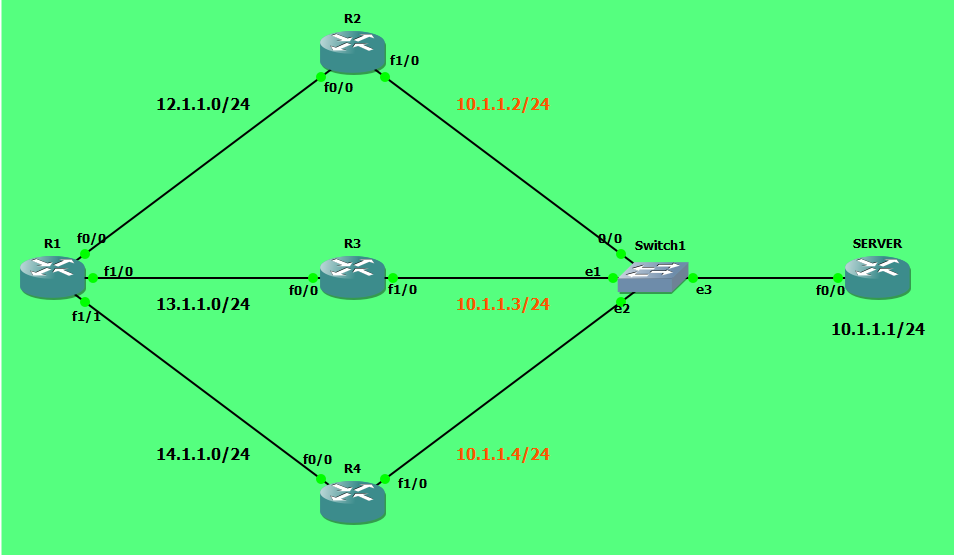
步骤2:请配置路由器上物理接口上的IPv4地址。
在R1上:
R1(config)#interface FastEthernet0/0
R1(config-if)#ip address 12.1.1.1 255.255.255.0
R1(config-if)#no shutdown
R1(config-if)#interface FastEthernet1/0
R1(config-if)#ip address 13.1.1.1 255.255.255.0
R1(config-if)#no shutdown
R1(config-if)#interface FastEthernet1/1
R1(config-if)#ip address 14.1.1.1 255.255.255.0
R1(config-if)#no shutdown
在R2上:
R2(config)#interface FastEthernet0/0
R2(config-if)#ip address 12.1.1.2 255.255.255.0
R2(config-if)#no shutdown
R2(config-if)#interface FastEthernet1/0
R2(config-if)#ip address 10.1.1.2 255.255.255.0
R2(config-if)#no shutdown
在R3上:
R3(config)#interface FastEthernet0/0
R3(config-if)#ip address 13.1.1.2 255.255.255.0
R3(config-if)#no shutdown
R3(config-if)#interface FastEthernet1/0
R3(config-if)#ip address 10.1.1.3 255.255.255.0
R3(config-if)#no shutdown
在R4上:
R4(config)#interface FastEthernet0/0
R4(config-if)#ip address 14.1.1.2 255.255.255.0
R4(config-if)#no shutdown
R4(config-if)#interface FastEthernet1/0
R4(config-if)#ip address 10.1.1.4 255.255.255.0
R4(config-if)#no shutdown
在服务器上:
SERVER(config)#interface FastEthernet0/0
SERVER(config-if)ip address 10.1.1.1 255.255.255.0
SERVER(config-if)#no shutdown
步骤3:使用相应的命令,在所有路由器上配置OSPF流程。路由器OSPF <进程ID>:
R1(config)#router ospf 1
R1(config-router)#exit
R2(config)#router ospf 1
R2(config-router)#exit
R3(config)#router ospf 1
R3(config-router)#exit
R4(config)#router ospf 1
R4(config-router)#exit
SERVER(config)#router ospf 1
SERVER(config-router)#exit
步骤4:在需要使用OSPF功能的接口上启用该功能,可以使用“interface level”子命令来实现这一点。ip ospf <进程ID> area <区域ID> :
R1(config)#interface FastEthernet0/0
R1(config-if)#ip ospf 1 area 0
R1(config-if)#interface FastEthernet1/0
R1(config-if)#ip ospf 1 area 0
R1(config-if)#interface FastEthernet1/1
R1(config-if)#ip ospf 1 area 0
R2(config)#interface FastEthernet0/0
R2(config-if)#ip ospf 1 area 0
R2(config-if)#interface FastEthernet1/0
R2(config-if)#ip ospf 1 area 0
R3(config)#interface FastEthernet0/0
R3(config-if)#ip ospf 1 area 0
R3(config-if)#interface FastEthernet1/0
R3(config-if)#ip ospf 1 area 0
R4(config)#interface FastEthernet0/0
R4(config-if)#ip ospf 1 area 0
R4(config-if)#interface FastEthernet1/0
R4(config-if)#ip ospf 1 area 0
SERVER(config)#interface FastEthernet0/0
SERVER(config-if)ip ospf 1 area 0
步骤5:检查路由器上的IPv4路由表,发现存在OSPF路由条目。
R1#show ip route
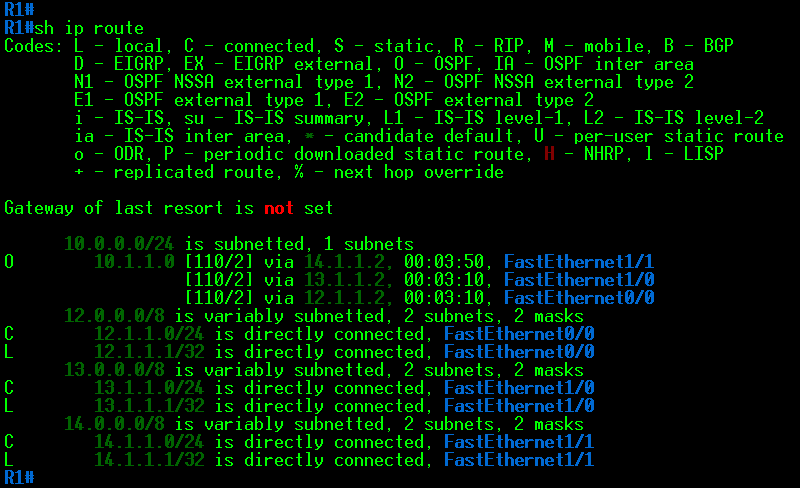
R2#show ip route
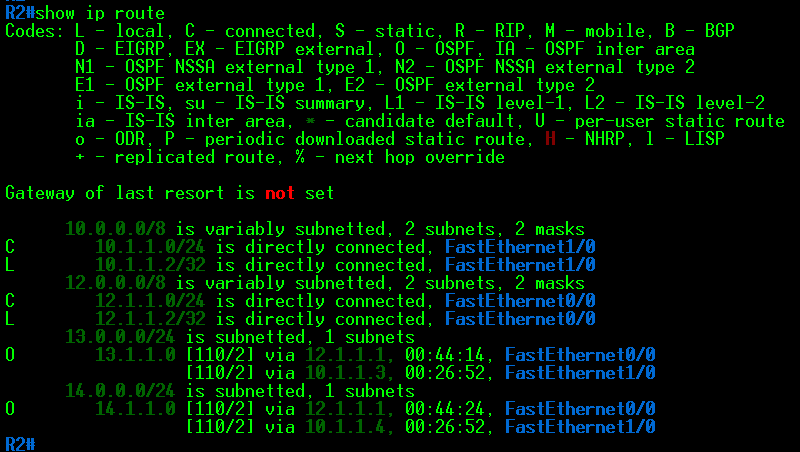
R3#show ip route
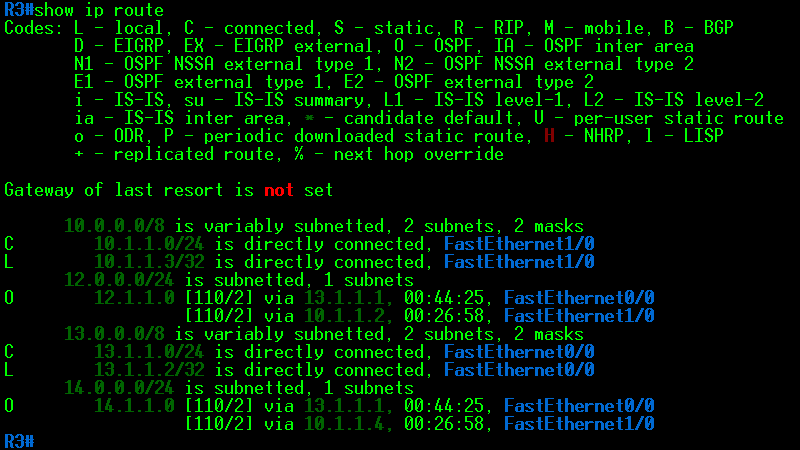
R4#show ip route
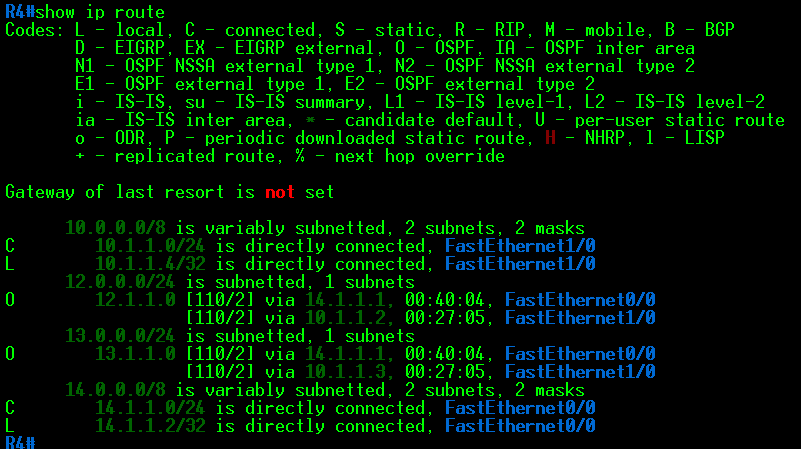
SERVER#show ip route
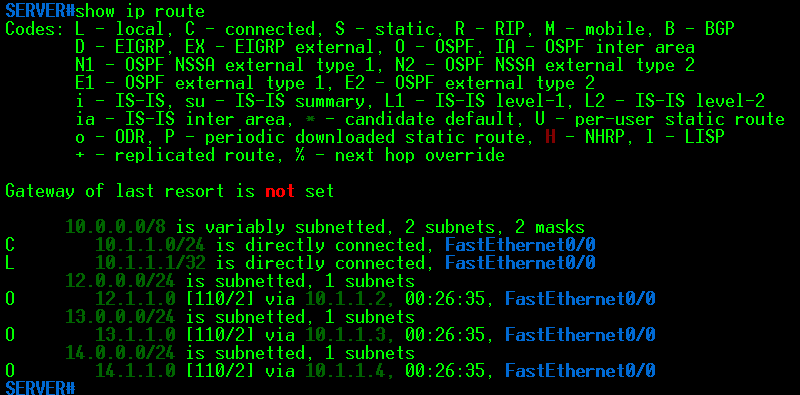
步骤6:配置R1,使其使用不超过1条路径来到达任何目标地址。使用路由器子命令来实现这一配置。最大路径数:<1-16> :
R1(config)#router ospf 1
R1(config-router)#maximum-paths 1
步骤7:再次检查R1的IPv4路由表,以确认最大路径设置是否发生了变化。
R1#show ip route
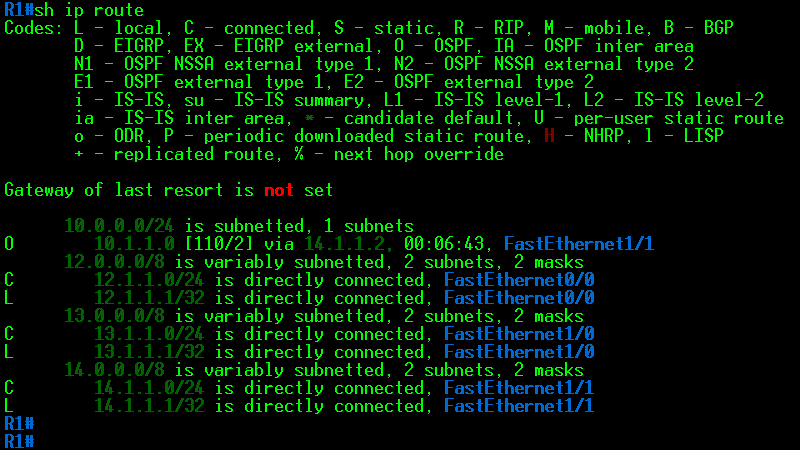
步骤8:验证整个拓扑结构中的连通性:
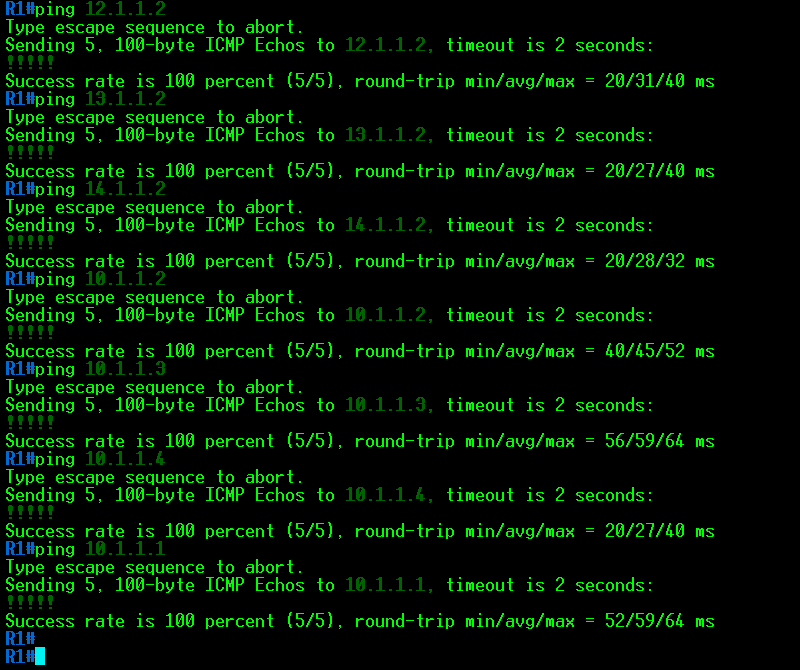
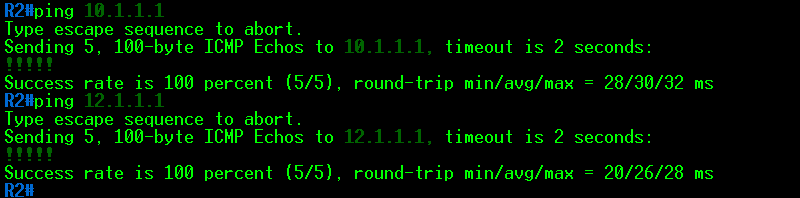
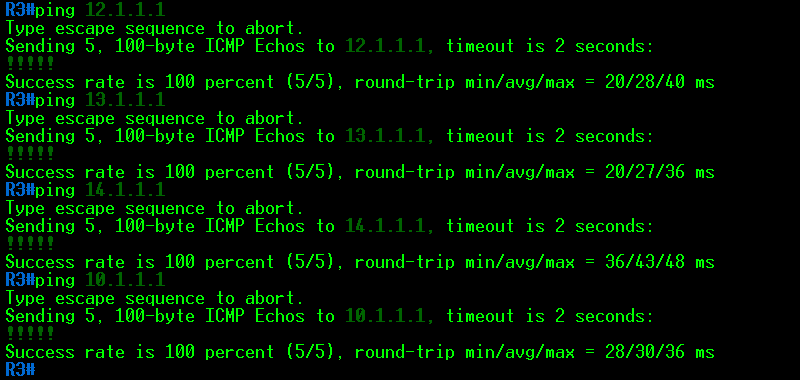
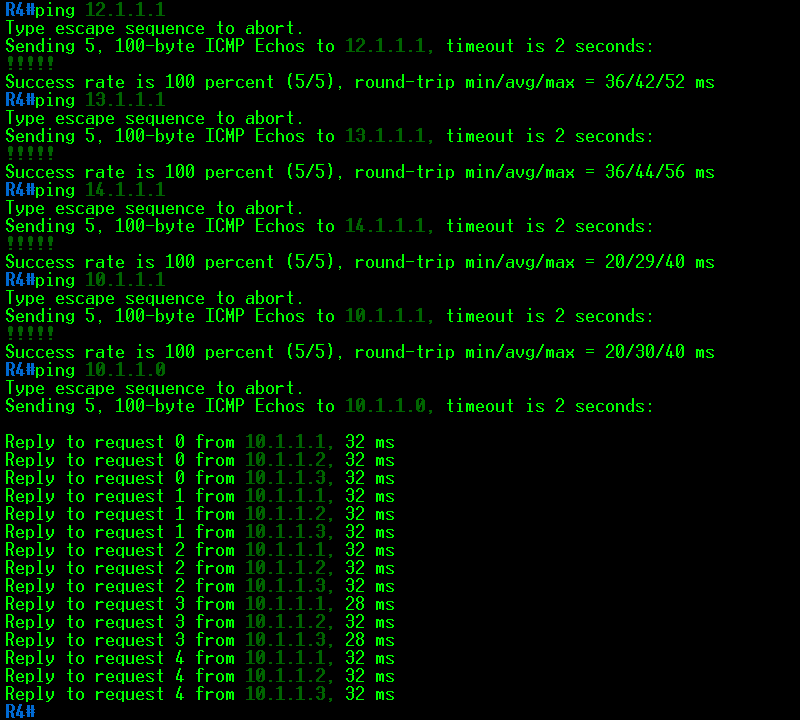
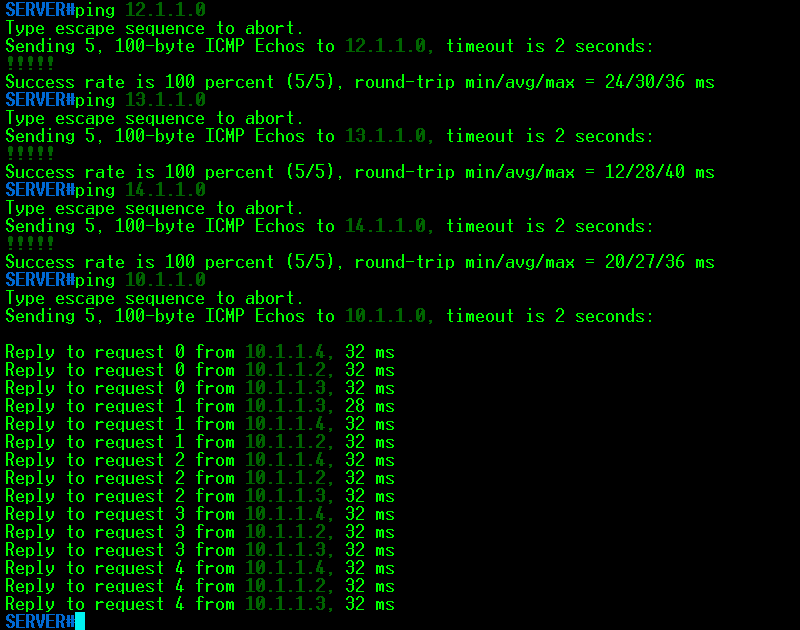
相关资讯




 闽公网安备 35012102500533号